LLM (Language Model)
On-device chat models — Qwen3, LFM2.5 and Gemma 3 — running fully on the Neural Engine. Tokenisation, the chat template, the KV cache, sampling and stop policy all ship inside the pack; you send text and read text. Nothing the user types leaves the device, and there is no per-token cost.
Use it three ways: one answer from one prompt, a streamed reply for a chat screen, or a conversation that remembers — with tools the model can call in any of them.
Main features
On-device chat: Qwen3-0.6B, LFM2.5-230M / 350M and Gemma3-1B — no server round-trip, no per-token cost.
Streaming and batch:
inferfor a full reply,infer_streamfor token deltas, on the same object.Conversations with memory:
TSChatSessionkeeps history, re-injects the system prompt and survives tool rounds.Tool calling: pass
[Tool]withexecuteclosures and the SDK runs them between turns on the same stream. A built-inDefaultToolscatalog covers weather, time, search and phone actions.Structured extraction: few-shot
LLMChatEnginecalls attemperature = 0turn receipts, chats and forms into JSON.Qwen3 thinking: opt-in reasoning prelude for hard questions; off by default for chat.
Reproducible output: same
seed+temperature = 0on the same device and pack gives the same text.
In this page
Here we will cover the following topics:
Supported models: the four packs, what each supports, and how to pick.
Quick start: one answer, a streamed reply, or a conversation — Swift and Flutter side by side.
Generate text:
inferandinfer_stream, and the generation knobs with their defaults.Conversations: the three ways to call the same model, and when each is right.
Tool calling: let the model call your functions; the built-in catalog.
Result object:
LLMResultfields and their Flutter JSON keys.Usage Guides: structured extraction, chat screens, memory limits, app functions as tools, thinking, reproducible tests.
Troubleshooting: symptom → cause → fix.
Load Progress / Prefetch / Cleanup: first-run download, warming the cache, releasing models.
Supported models
Four packs. They share one API; they differ in size, tool support and whether they can reason before answering.
Model |
HF repo |
Size |
Device |
Fleet pin |
|---|---|---|---|---|
Qwen3-0.6B |
|
0.6B |
NPU |
v1.1 |
LFM2.5-230M |
|
230M |
NPU |
v1.1 |
LFM2.5-350M |
|
350M |
NPU |
v1.1 |
Gemma3-1B |
|
1B |
NPU |
v1.1 |
Feature |
Qwen3-0.6B |
LFM2.5-230M |
LFM2.5-350M |
Gemma3-1B |
|---|---|---|---|---|
Chat + streaming |
yes |
yes |
yes |
yes |
Tool calling |
yes |
yes |
yes |
— |
Thinking mode |
yes |
— |
— |
— |
Which one?
You need… |
Pick |
Why |
|---|---|---|
A voice assistant with tools |
Qwen3-0.6B |
Tools, thinking when needed, and the same tokenizer as Qwen3-ASR. |
The smallest, fastest chat |
LFM2.5-230M |
Lowest memory and first-token latency; still calls tools. |
Structured extraction from documents |
LFM2.5-350M |
Better instruction following than 230M at little extra cost. |
Longest, most fluent replies |
Gemma3-1B |
Largest pack; no tool calling — passing |
Context window is fixed per pack. Prompt, history and the reply share it; the SDK trims history for you in a session.
Quick start
Three ways to use the model. Pick by whether this call is the whole job or one turn of a conversation.
You want |
Memory |
Use |
|---|---|---|
One answer from one prompt |
none |
|
A reply streamed into a chat bubble |
none |
|
A conversation that remembers |
kept by the SDK |
|
One answer
import TheStageSDK

try await TheStageAI.shared.initialize(api_token: "your-api-token")

let llm = try await TSLLM(
    engines_path: "TheStageAI/Qwen3-0.6B"
)

// the pack's tuned sampling
var config = llm.generation_defaults
config.max_new_tokens = 128
config.enable_thinking = false

let result = llm.infer(
    prompt: "Give me a two-line haiku about the ocean.",
    system_prompt: "You are a concise assistant.",
    config: config
)
print(result.text)
import 'package:thestage_apple_sdk/thestage_apple_sdk.dart';

await TheStageFlutterSDK.initialize(api_token: 'your-api-token');
await TheStageFlutterSDK.start_model(
  model_name: 'llm',
  engines_path: 'TheStageAI/Qwen3-0.6B',
);

final rows = await TheStageFlutterSDK.infer(
  model_name: 'llm',
  input_json: {
    'prompt': 'Give me a two-line haiku about the ocean.',
    'system_prompt': 'You are a concise assistant.',
    'max_new_tokens': 128,
    'enable_thinking': false,
  },
);
print(rows[0]['text']);
A streamed reply
let llm = try await TSLLM(engines_path: "TheStageAI/Qwen3-0.6B")
var config = llm.generation_defaults
config.enable_thinking = false

for await chunk in llm.infer_stream(
    prompt: "Tell me a short story.",
    config: config
) {
    if chunk.is_final {
        print("\n\(chunk.tokens_per_second ?? 0) tok/s")
    } else {
        // append, never replace
        bubble.text += chunk.text
    }
}
await TheStageFlutterSDK.start_model(
  model_name: 'llm',
  engines_path: 'TheStageAI/Qwen3-0.6B',
);

final stream = TheStageFlutterSDK.infer_stream(
  model_name: 'llm',
  input_json: {
    'prompt': 'Tell me a short story.',
    'max_new_tokens': 512,
    'enable_thinking': false,
  },
);
await for (final chunk in stream) {
  if (chunk['is_final'] == true) break;
  bubble.value += chunk['delta'] as String? ?? '';
}
A conversation that remembers
let llm = try await TSLLM(engines_path: "TheStageAI/Qwen3-0.6B")
var config = llm.generation_defaults
config.enable_thinking = false

let session = LLMChatEngine(llm: llm).chat_session(
    system_prompt: "You are a friendly assistant. Answer in one sentence.",
    memory: .SLIDING(max_turns: 10)
)

for await event in try session.infer_stream(
    user_request: "My name is Ada.", config: config
) {
    if case .text_delta(let t) = event { print(t, terminator: "") }
}

for await event in try session.infer_stream(
    user_request: "What is my name?", config: config
) {
    if case .text_delta(let t) = event { print(t, terminator: "") }
}
// "Your name is Ada."
await TheStageFlutterSDK.start_model(
  model_name: 'llm',
  engines_path: 'TheStageAI/Qwen3-0.6B',
);

// Keep history in the app; send it on every turn.
final history = <Map<String, String>>[
  {'role': 'user',      'content': 'My name is Ada.'},
  {'role': 'assistant', 'content': 'Nice to meet you, Ada.'},
  {'role': 'user',      'content': 'What is my name?'},
];

final stream = TheStageFlutterSDK.infer_stream(
  model_name: 'llm',
  input_json: {
    'messages': history,
    'system_prompt': 'You are a friendly assistant. Answer in one sentence.',
    'max_new_tokens': 128,
    'enable_thinking': false,
  },
);
final reply = StringBuffer();
await for (final chunk in stream) {
  if (chunk['is_final'] == true) break;
  reply.write(chunk['delta'] ?? '');
}
history.add({'role': 'assistant', 'content': reply.toString()});
Important API
Purpose |
Swift |
Flutter |
|---|---|---|
Load a model |
|
|
One answer |
|
|
Streamed reply |
|
|
Conversation |
|
|
Tools |
|
|
Release |
drop the object |
|
Generate text
One prompt in, one reply out. infer returns when the reply is
complete; infer_stream yields tokens as they are produced, so a
chat screen fills in while the user watches. Both take the same
LLMGenerationConfig.
let llm = try await TSLLM(engines_path: "TheStageAI/Qwen3-0.6B")

var config = llm.generation_defaults
config.max_new_tokens = 256
// factual; raise for creative
config.temperature = 0.3
config.enable_thinking = false

// Batch
let result = llm.infer(
    prompt: "Summarise this in two sentences: \(article)",
    system_prompt: "You are a precise editor.",
    config: config
)
if result.stop_reason == "max_new_tokens" {
    // reply was cut off — raise the cap or show "…"
}

// Streaming
for await chunk in llm.infer_stream(
    prompt: "Summarise this in two sentences: \(article)",
    system_prompt: "You are a precise editor.",
    config: config
) {
    if !chunk.is_final { bubble.text += chunk.text }
}
await TheStageFlutterSDK.start_model(
  model_name: 'llm',
  engines_path: 'TheStageAI/Qwen3-0.6B',
);

final input = {
  'prompt': 'Summarise this in two sentences: $article',
  'system_prompt': 'You are a precise editor.',
  'max_new_tokens': 256,
  // factual; raise for creative
  'temperature': 0.3,
  'enable_thinking': false,
};

// Batch
final rows = await TheStageFlutterSDK.infer(
  model_name: 'llm', input_json: input);
if (rows[0]['stop_reason'] == 'max_new_tokens') {
  // reply was cut off — raise the cap or show "…"
}

// Streaming
await for (final chunk in TheStageFlutterSDK.infer_stream(
  model_name: 'llm', input_json: input)) {
  if (chunk['is_final'] == true) break;
  bubble.value += chunk['delta'] as String? ?? '';
}
Generation options — LLMGenerationConfig (Swift) or the same
keys in input_json (Flutter). Start from llm.generation_defaults:
it holds the sampling the pack was tuned with, and anything you do not
set keeps that value.
Field |
Pack default |
Change it when |
|---|---|---|
|
512 |
Replies are cut off ( |
|
0.7 |
|
|
20 / 1.0 / 0 |
Leave alone unless you are tuning a specific voice of output. |
|
1.0 |
|
|
true |
Set false for chat. Qwen3 only; adds a reasoning prelude that eats the token budget and looks like a pause in the UI. |
|
random |
Set for reproducible tests, with |
|
|
Stop early on a marker your prompt format defines. |
Chat template, end-of-sequence tokens and the context window are baked into the pack; there is nothing to set.
Conversations
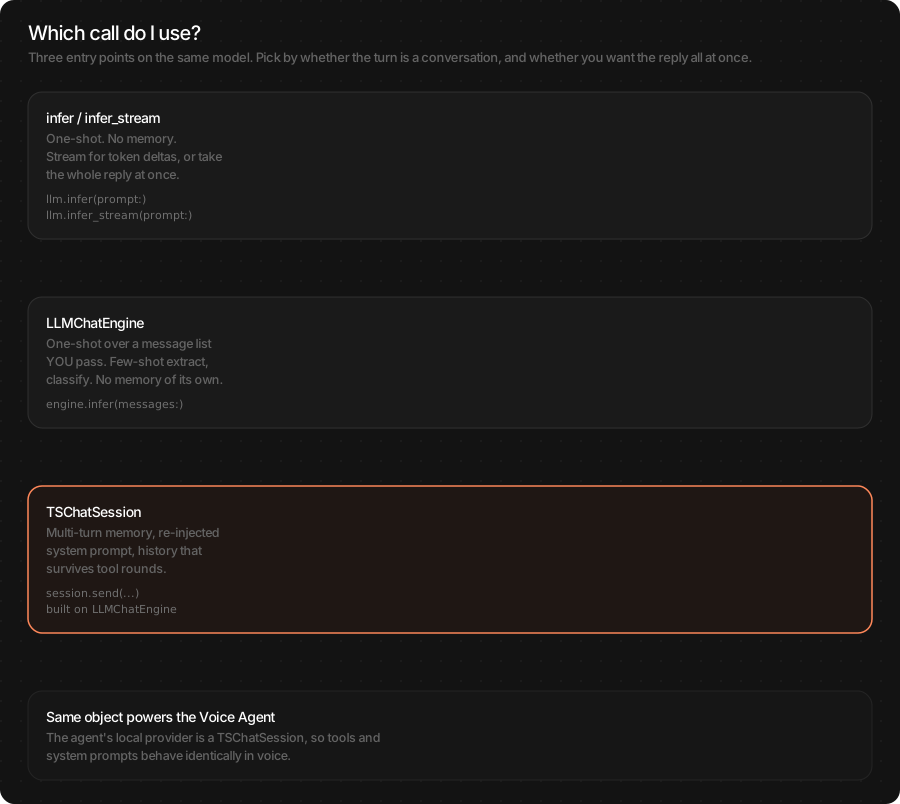
A chat app needs the model to remember the last turn. A form filler needs it to forget everything and follow a few examples. Those are different calls, and picking the wrong one is the most common source of “the model ignored my context”.
Use this |
When |
Not when |
|---|---|---|
|
One user string plus a system prompt. The call is the whole job. |
The next turn must remember this one. |
|
You own the full message list for one call: few-shot extract, classify, rewrite. Nothing is stored. |
The user will talk for several turns. |
|
A conversation. You send the next user request; the session keeps history, re-injects the system prompt and stores tool rounds. |
A one-shot job. |
let llm = try await TSLLM(engines_path: "TheStageAI/Qwen3-0.6B")
var config = llm.generation_defaults
config.enable_thinking = false

let engine = LLMChatEngine(llm: llm)

// Few-shot, one call, no memory
let extracted = try await engine.infer(
    messages: [
        .user(EXAMPLE_INPUT),
        .assistant(EXAMPLE_OUTPUT),
        .user(liveText),
    ],
    system_prompt: SCHEMA_PROMPT,
    tools: [],
    config: config
)

// Conversation with memory
let session = engine.chat_session(
    system_prompt: "You are a helpful assistant.",
    tools: [],
    memory: .SLIDING(max_turns: 10)
)
let reply = try await session.infer(user_request: "Hi!", config: config)
// grows by two: user + assistant
print(session.history.count)
// start a new conversation
session.clear()
await TheStageFlutterSDK.start_model(
  model_name: 'llm',
  engines_path: 'TheStageAI/Qwen3-0.6B',
);

// Both shapes use the same call; you own the list.
// Few-shot, one call:
final extracted = TheStageFlutterSDK.infer_stream(
  model_name: 'llm',
  input_json: {
    'messages': [
      {'role': 'user',      'content': exampleInput},
      {'role': 'assistant', 'content': exampleOutput},
      {'role': 'user',      'content': liveText},
    ],
    'system_prompt': schemaPrompt,
    'temperature': 0,
    'enable_thinking': false,
  },
);

// Conversation: append each reply to `history` and resend it.
// Trim the oldest turns yourself when the reply stops fitting.
Important API
TSChatSession — created by LLMChatEngine(llm:).chat_session(…):
Member |
Role |
|---|---|
|
Send the next user turn; returns |
|
Same, as |
|
Change between turns; applied on the next request. |
|
The messages the model will see next. Read-only view. |
|
New conversation, same model. |
|
Stop the current reply — the user tapped “stop”. |
|
How many user-led turns are kept. Older ones drop off; the system prompt never does. |
Note
There is no role argument on a session — you send user text; the
session writes the assistant and tool turns itself. A canned
assistant reply for few-shot belongs in LLMChatEngine.
On Flutter, messages is honoured by infer_stream; batch infer
reads only prompt.
Tool calling
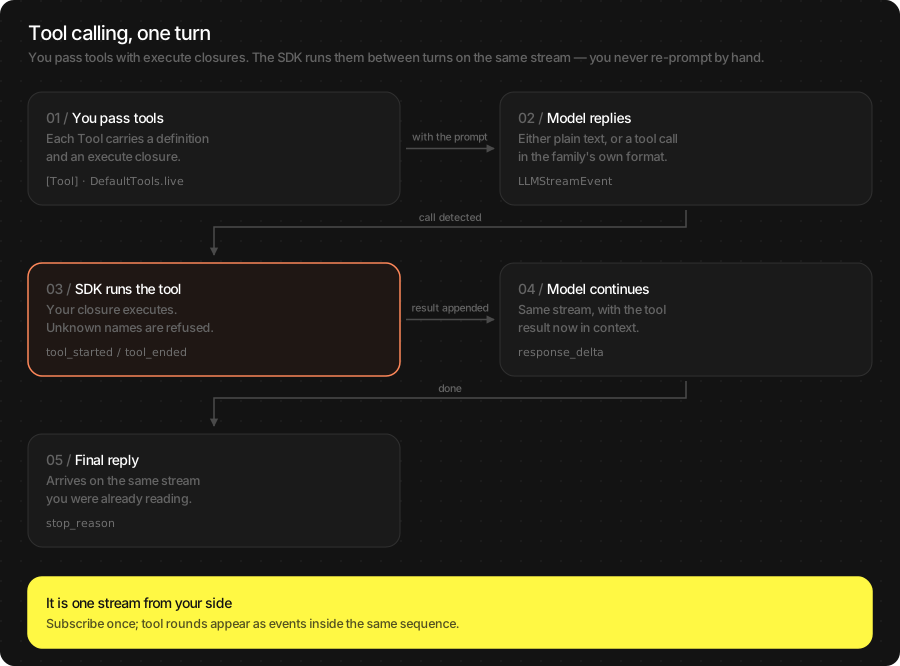
A tool is a function you write that the model may decide to call — look up an order, check the weather, open Maps. You describe it with a name, a description and a JSON schema; the SDK teaches the model the pack’s wire format, parses the call, runs your closure, feeds the result back and continues the reply on the same stream. Your loop never sees markup.
let llm = try await TSLLM(engines_path: "TheStageAI/Qwen3-0.6B")

let orderStatus = Tool(
    name: "order_status",
    description: "Look up the delivery status of an order by its number.",
    parameters: [
        "type": "object",
        "properties": [
            "order_id": ["type": "string", "description": "Order number"],
        ],
        "required": ["order_id"],
    ],
    execute: { call in
        let id = call.arguments["order_id"] as? String ?? ""
        // any String
        return try await orders.statusJSON(for: id)
    }
)

var config = llm.generation_defaults
config.enable_thinking = false

for await event in try llm.infer_stream(
    prompt: "Where is my order 4471?",
    // yours + built-ins
    tools: [orderStatus] + DefaultTools.live,
    system_prompt: DefaultTools.voice_system_prompt,
    config: config
) {
    switch event {
    case .text_delta(let t):            bubble.text += t
    case .tool_call(let call):          showChip("Checking \(call.name)…")
    // never shown or spoken
    case .tool_result:                  break
    case .final(let stop, _, _, _, _, _, _): done(stop)
    default:                            break
    }
}
await TheStageFlutterSDK.start_model(
  model_name: 'llm',
  engines_path: 'TheStageAI/Qwen3-0.6B',
);

// Flutter runs the tool itself: the stream ends at the tool call,
// you execute it, append the result, and ask again.
final tools = [
  {
    'name': 'order_status',
    'description': 'Look up the delivery status of an order by its number.',
    'parameters': {
      'type': 'object',
      'properties': {
        'order_id': {'type': 'string', 'description': 'Order number'},
      },
      'required': ['order_id'],
    },
  },
];
final history = [
  {'role': 'user', 'content': 'Where is my order 4471?'},
];

Future<void> turn() async {
  final stream = TheStageFlutterSDK.infer_stream(
    model_name: 'llm',
    input_json: {'messages': history, 'tools': tools, 'enable_thinking': false},
  );
  await for (final chunk in stream) {
    switch (chunk['kind']) {
      case 'text_delta':
        bubble.value += chunk['delta'] as String? ?? '';
      case 'tool_call':
        final name = chunk['name'] as String;
        final args = chunk['arguments'] as Map;
        final result = await orders.statusJson(args['order_id']);
        history.add({'role': 'tool', 'content': result});
        // continue the reply
        await turn();
        return;
      case 'final':
        return;
    }
  }
}
await turn();
Important API
Events on a tool-enabled stream:
Swift |
Flutter |
What to do |
|---|---|---|
|
|
Append to the bubble. Speak it, if you have TTS. Only this. |
|
|
Show a chip. Swift runs |
|
|
Nothing — it is for the model. |
|
|
Optional “thinking…” indicator; never render as the answer. |
|
|
Turn is over. Read |
Built-in tools — DefaultTools:
Set |
Tools |
|---|---|
|
|
|
|
|
|
|
|
max_tool_rounds (default 4) caps how many times the model may
call tools in one turn, so a confused model cannot loop.
Warning
Gemma3-1B has no tool support — passing tools throws. Check
llm.supports_tool_calling if the model is user-selectable. Batch
infer(prompt:tools:) also works (result.tool_calls /
result.final_text) but a chat UI wants the stream.
Result object
LLMResult is what infer returns. The final stream chunk carries
the same metrics.
let llm = try await TSLLM(engines_path: "TheStageAI/Qwen3-0.6B")
var config = llm.generation_defaults
config.enable_thinking = false

let result = llm.infer(prompt: prompt, config: config)

// the reply (includes <think> if thinking was on)
result.text
// the reply with thinking and tool markup removed
result.final_text
// "eos" | "max_new_tokens" | "stop_sequence"
result.stop_reason
result.tokens_per_second
// seconds
result.time_to_first_token
await TheStageFlutterSDK.start_model(
  model_name: 'llm',
  engines_path: 'TheStageAI/Qwen3-0.6B',
);

final rows = await TheStageFlutterSDK.infer(
  model_name: 'llm',
  input_json: input,
);
final r = rows[0];

// the reply
r['text'];
// with thinking and tool markup removed
r['final_text'];
// 'eos' | 'max_new_tokens' | 'stop_sequence'
r['stop_reason'];
r['tokens_per_second'];
r['time_to_first_token'];
Swift |
Flutter JSON |
Meaning |
|---|---|---|
|
|
Raw reply. |
|
|
Reply with |
|
|
The reasoning prelude, when thinking was on. |
|
|
|
|
|
|
|
same |
Sizes, for budgeting the context window. |
|
same |
Latency and speed. |
Usage Guides
Each guide is one production question: what you are building, what to use, the code, and what not to forget.
Turn a receipt or message into structured data
Problem
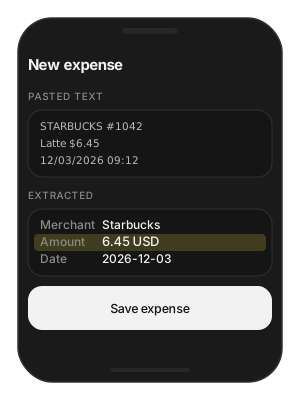
Building — an expense app: the user pastes a receipt or a bank SMS and gets a filled-in expense.
Users want — paste, see merchant / amount / date filled in, tap save. No typing, no server round-trip, works on a plane.
Hard part — the output must parse every time — one stray word breaks the JSON — and the same input must give the same result thousands of times a day.
Solution — what to use
TSLLM— loaded once for the screen’s lifetime.LLMChatEngine.infer(messages:...)— one call with a system prompt, one worked example, and the pasted text; it remembers nothing between calls, which is what you want here.temperature = 0— greedy decoding, so the output is repeatable and a failure is debuggable.final_text— the field to parse (markup stripped).Flutter:
infer_streamwithmessages— batchinferignores history.
let llm = try await TSLLM(engines_path: "TheStageAI/Qwen3-0.6B")

let SYSTEM = """
Extract {merchant, amount, currency, date} from the text. \
Reply with JSON only. Use null for missing fields.
"""

var config = llm.generation_defaults
config.temperature = 0
config.max_new_tokens = 96
config.enable_thinking = false

// the text the user pasted into the field
let pastedText: String = pasteField.text

let engine = LLMChatEngine(llm: llm)
let result = try await engine.infer(
    messages: [
        .user("STARBUCKS #1042  $6.45  12/03/2026"),
        .assistant(#"{"merchant":"Starbucks","amount":6.45,"currency":"USD","date":"2026-12-03"}"#),
        .user(pastedText),
    ],
    system_prompt: SYSTEM,
    tools: [],
    config: config
)
let fields = try JSONDecoder().decode(Receipt.self,
                                      from: Data(result.final_text.utf8))
await TheStageFlutterSDK.start_model(
  model_name: 'llm',
  engines_path: 'TheStageAI/Qwen3-0.6B',
);

const system =
    'Extract {merchant, amount, currency, date} from the text. '
    'Reply with JSON only. Use null for missing fields.';

// the text the user pasted into the field
final pastedText = pasteController.text;

final out = StringBuffer();
await for (final chunk in TheStageFlutterSDK.infer_stream(
  model_name: 'llm',
  input_json: {
    'messages': [
      {'role': 'user', 'content': 'STARBUCKS #1042  \$6.45  12/03/2026'},
      {'role': 'assistant', 'content':
        '{"merchant":"Starbucks","amount":6.45,"currency":"USD","date":"2026-12-03"}'},
      {'role': 'user', 'content': pastedText},
    ],
    'system_prompt': system,
    'temperature': 0,
    'max_new_tokens': 96,
    'enable_thinking': false,
  },
)) {
  if (chunk['is_final'] == true) break;
  out.write(chunk['delta'] ?? '');
}
final fields = jsonDecode(out.toString());
Attention
Parse
final_text, nottext— it has markup stripped.One good example beats three mediocre ones; the context window is small on these packs.
Wrap
jsonDecodein a retry: attemperature = 0a second call with the same input is deterministic, so if it fails once it will fail again — log it and fall back to a regex.Worked recipes for extract / classify / rewrite: Apple SDK: small on-device LLMs.
A chat screen that streams without glitches
Problem
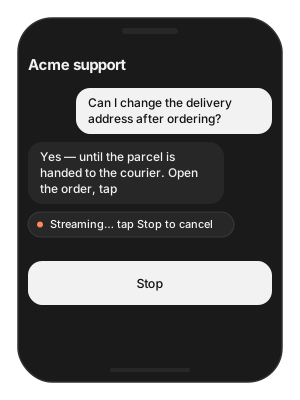
Building — a support chat for a retail app, answered by the on-device model.
Users want — the reply appears word by word, a Stop button really stops it, and a reply cut short by the length cap does not look finished.
Hard part — tokens must be appended, not re-rendered; abandoning
a stream keeps the model generating for nobody; the length cap is
silent unless you read stop_reason.
Solution — what to use
LLMChatEngine.chat_session(system_prompt:memory:)— owns the history so each turn is one call.infer_stream(user_request:config:)—text_deltaevents go straight into the bubble.session.cancel_in_flight()— the Stop button..finalevent — readstop_reason;"max_new_tokens"means mark the bubble as truncated.enable_thinking = falseon Qwen3 — otherwise the first seconds look like a hang.
let llm = try await TSLLM(engines_path: "TheStageAI/Qwen3-0.6B")

let session = LLMChatEngine(llm: llm).chat_session(
    system_prompt: "You are the support assistant for Acme. Be brief.",
    memory: .SLIDING(max_turns: 8)
)
var config = llm.generation_defaults
config.max_new_tokens = 384
config.enable_thinking = false

// the message the user just sent
let userText: String = composer.text

let replyTask = Task {
    for await event in try session.infer_stream(
        user_request: userText, config: config
    ) {
        switch event {
        case .text_delta(let t):
            bubble.text += t
        case .final(let stop, _, _, _, _, _, _):
            if stop == "max_new_tokens" { bubble.markTruncated() }
        default: break
        }
    }
}
stopButton.onTap = { session.cancel_in_flight() }
await TheStageFlutterSDK.start_model(
  model_name: 'llm',
  engines_path: 'TheStageAI/Qwen3-0.6B',
);

// your conversation so far: {'role','content'} maps, newest last
final history = [...chat.messages, {'role': 'user', 'content': composer.text}];

final sub = TheStageFlutterSDK.infer_stream(
  model_name: 'llm',
  input_json: {
    'messages': history,
    'system_prompt': 'You are the support assistant for Acme. Be brief.',
    'max_new_tokens': 384,
    'enable_thinking': false,
  },
).listen((chunk) {
  if (chunk['is_final'] == true) {
    if (chunk['stop_reason'] == 'max_new_tokens') bubble.markTruncated();
    return;
  }
  bubble.value += chunk['delta'] as String? ?? '';
});
stopButton.onPressed = () => sub.cancel();
Attention
Append deltas; never rebuild the bubble from scratch per token.
Always drain or cancel the stream. Abandoning a consumer mid-reply leaves the model generating for nobody.
Keep the system prompt short — it is paid for on every turn.
enable_thinking = falseon Qwen3, or the first seconds look like a hang.
Keep the conversation on device without running out of context
Problem
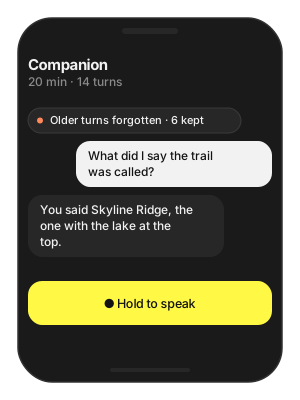
Building — a companion app that talks for twenty minutes at a time.
Users want — the assistant remembers the thread of the conversation and never suddenly stops mid-sentence.
Hard part — small packs have a small context window; the app has to decide what the model is allowed to forget, and facts pinned in the history are the first thing to go.
Solution — what to use
chat_session(memory: .SLIDING(max_turns:))— the session drops the oldest exchanges first; the system prompt is re-injected every turn and never drops.session.system_prompt— where durable facts live (name, preferences), not in history.session.clear()— new topic, same loaded model.Flutter: you own the
messageslist — keep the last N exchanges yourself.
let llm = try await TSLLM(engines_path: "TheStageAI/Qwen3-0.6B")
let persona = "You are Sam, a warm hiking companion. Keep replies short."

let session = LLMChatEngine(llm: llm).chat_session(
    system_prompt: persona,
    // ~6 exchanges of context
    memory: .SLIDING(max_turns: 6)
)

// Pin facts the model must never forget into the system prompt,
// not into history:
session.system_prompt = persona + "\nThe user's name is Ada. They like hiking."

// New topic, same model:
session.clear()
// You own the list on Flutter. Keep the last N exchanges and put
// durable facts in the system prompt.
const maxTurns = 6;
void trim(List<Map<String, String>> history) {
  while (history.where((m) => m['role'] == 'user').length > maxTurns) {
    history.removeAt(0);
  }
}
Attention
Memory is counted in turns, not tokens; the session also trims by tokens so a long paste does not overflow.
Durable facts go in the system prompt; history is for the flow of the conversation.
stop_reason == "max_new_tokens"on every reply means the window is full of history — lowermax_turns.
Let the model call your app’s functions
Problem
Building — a retail assistant that answers from live data.
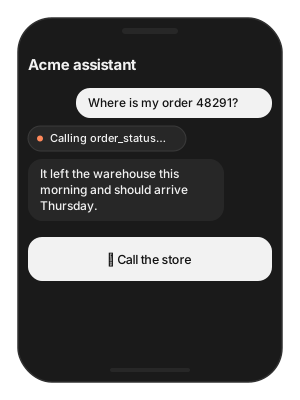
Users want — ask “where is my order?” and hear the real status; say “call the store” and have the dialler open — without a menu.
Hard part — the model must know when to call each function, its answer must never expose the raw payload, and phone actions must stay under the user’s control.
Solution — what to use
Tool(name:description:parameters:execute:)— one per function; thedescriptionsays when to use it.DefaultTools.phone— dial / maps / SMS that open system UI for the user to confirm.chat_session(system_prompt:tools:memory:)—DefaultTools.voice_system_promptexplains the tools to the model..tool_callevent — show a “checking…” chip;.text_delta— the only thing the user sees.Flutter: tools are plain JSON; you run the function on
tool_calland send the result back.
let llm = try await TSLLM(engines_path: "TheStageAI/Qwen3-0.6B")
var config = llm.generation_defaults
config.enable_thinking = false

let orderStatus = Tool(
    name: "order_status",
    description: "Delivery status for an order number.",
    parameters: ["type": "object",
                 "properties": ["order_id": ["type": "string"]],
                 "required": ["order_id"]],
    execute: { call in
        let id = call.arguments["order_id"] as? String ?? ""
        // your API client; returns a short JSON string
        return try await orders.statusJSON(for: id)
    }
)

let session = LLMChatEngine(llm: llm).chat_session(
    system_prompt: DefaultTools.voice_system_prompt + "\nYou help Acme customers.",
    tools: [orderStatus] + DefaultTools.phone,
    memory: .SLIDING(max_turns: 8)
)

// the message the user just sent
let userText: String = composer.text

for await event in try session.infer_stream(
    user_request: userText, config: config
) {
    if case .text_delta(let t) = event { bubble.text += t }
    if case .tool_call(let call) = event { chip.show(call.name) }
}
// Flutter executes tools itself — see the Tool calling section
// above for the full loop. The tool list is plain JSON:
final tools = [
  {
    'name': 'order_status',
    'description': 'Delivery status for an order number.',
    'parameters': {
      'type': 'object',
      'properties': {'order_id': {'type': 'string'}},
      'required': ['order_id'],
    },
  },
];
// On 'tool_call': run your API, append {'role': 'tool', 'content': json},
// and call infer_stream again with the same tools.
Attention
Return a short JSON string from
execute. The model reads it verbatim; a 4 KB payload eats the context window.Describe when to call the tool in
description, not just what it does — that is what the model keys on.Never speak or display
tool_result; it is for the model.Qwen3 and LFM2.5 call tools; Gemma3-1B does not.
Replies are slow to start, or begin with a blank
Problem
Building — any chat or assistant on a Qwen3 pack.
Users want — the first word within a moment of asking, never a
bubble that shows <think> or nothing at all.
Hard part — Qwen3 reasons before it answers, and that reasoning shares the token budget with the reply — a short cap leaves no room for an answer.
Solution — what to use
enable_thinking = false— for chat and everything latency-bound.enable_thinking = truewithmax_new_tokens≥ 1024 — only for genuinely hard questions.final_text— always what you render;thinking— optional to show.LFM2.5 and Gemma3 ignore the flag.
let llm = try await TSLLM(engines_path: "TheStageAI/Qwen3-0.6B")

// Chat: off
var chat = llm.generation_defaults
chat.enable_thinking = false
chat.max_new_tokens = 256

// Hard reasoning: on, with headroom
var reason = llm.generation_defaults
reason.enable_thinking = true
reason.max_new_tokens = 1024
reason.temperature = 0.6

let r = llm.infer(prompt: "Why does ice float?", config: reason)
// the reasoning, if you want to show it
print(r.thinking ?? "")
// the answer
print(r.final_text)
await TheStageFlutterSDK.start_model(
  model_name: 'llm',
  engines_path: 'TheStageAI/Qwen3-0.6B',
);

// Chat: off
final chat = {'enable_thinking': false, 'max_new_tokens': 256};

// Hard reasoning: on, with headroom
final reason = {
  'enable_thinking': true,
  'max_new_tokens': 1024,
  'temperature': 0.6,
};

final rows = await TheStageFlutterSDK.infer(
  model_name: 'llm',
  input_json: {'prompt': 'Why does ice float?', ...reason},
);
// the reasoning
print(rows[0]['thinking']);
// the answer
print(rows[0]['final_text']);
Attention
Show
final_text, never rawtext, when thinking is on.Thinking tokens count against
max_new_tokens;256with thinking on often yields an empty answer.LFM2.5 and Gemma3 ignore the flag.
Make outputs reproducible for tests
Problem
Building — CI that compares model output to golden files.
Users want — a green build when nothing changed, and a red one only when the model or the prompt did.
Hard part — sampling is random by design, a fleet update can swap the pack under the test, and different chips can differ at the last token.
Solution — what to use
temperature = 0plusseed— deterministic on one device and pack revision.revision:on the model — pin it so a fleet update cannot change the golden.One device class per golden set.
let llm = try await TSLLM(engines_path: "TheStageAI/Qwen3-0.6B")

var config = llm.generation_defaults
config.temperature = 0
config.seed = 42
config.max_new_tokens = 64
config.enable_thinking = false

let a = llm.infer(prompt: "Write a haiku about the ocean.", config: config)
let b = llm.infer(prompt: "Write a haiku about the ocean.", config: config)
XCTAssertEqual(a.text, b.text)
await TheStageFlutterSDK.start_model(
  model_name: 'llm',
  engines_path: 'TheStageAI/Qwen3-0.6B',
);

final input = {
  'prompt': 'Write a haiku about the ocean.',
  'temperature': 0,
  'seed': 42,
  'max_new_tokens': 64,
  'enable_thinking': false,
};
final a = await TheStageFlutterSDK.infer(
  model_name: 'llm',
  input_json: input,
);
final b = await TheStageFlutterSDK.infer(
  model_name: 'llm',
  input_json: input,
);
expect(a[0]['text'], b[0]['text']);
Attention
Pin
revision:on the model in tests so a fleet update cannot change the golden.Different chips (M2 vs A17) may differ at the last token. Run goldens on one device class.
Troubleshooting
Symptom |
Cause |
Fix |
|---|---|---|
Reply cut off mid-sentence |
|
Raise |
Seconds of silence, then the answer |
Qwen3 thinking is on. |
|
Bubble shows |
Rendering |
Render |
Model “forgot” the previous turn |
Using |
|
Passing |
Gemma3-1B has no tool support. |
Use Qwen3 or LFM2.5; check |
Tool never gets called |
Description does not say when to use it. |
Rewrite |
Garbled or wrong-language output |
Temperature too high, or template tokens pasted into |
Start from |
Long answers loop |
No repetition penalty. |
|
Out of memory |
Several pipelines loaded at once. |
Use a smaller pack; stop ASR / TTS / VLM you are not using. |
Flutter: history ignored |
|
Use |
Load Progress / Prefetch / Cleanup
First run downloads and prepares the pack; later runs hit the cache. Show progress the first time, warm the cache on a splash screen, and release models you are done with.
let ai = TheStageAI.shared

// Progress
let llm = try await TSLLM(
    engines_path: "TheStageAI/Qwen3-0.6B",
    on_load_progress: { p in
        print("[\(p.model)] \(p.phase) \(Int(p.fraction * 100))%")
    }
)

// Prefetch on a splash screen, construct later
let engines_dir = try await ai.prefetch_engines(repo_id: "TheStageAI/Qwen3-0.6B")
let llm = try await TSLLM(engines_path: engines_dir)

// Cleanup: drop the reference, or
_ = try ai.stop_model(model_name: "llm")
// Progress
TheStageFlutterSDK.on_progress.listen((event) {
  if (event['model_name'] != 'llm') return;
  print('[llm] ${event['phase']} ${((event['progress'] ?? 0) * 100).round()}%');
});

await TheStageFlutterSDK.start_model(
  model_name: 'llm',
  engines_path: 'TheStageAI/Qwen3-0.6B',
);

// Cleanup
await TheStageFlutterSDK.stop_model(model_name: 'llm');
Phases: downloading → extracting → loading → ready. Cache
hits skip the first two. Full contract: TheStage Apple SDK
(Load Progress).