Logging & Debugging
What the SDK can tell you when something goes wrong, and how to get it into a support ticket or a crash reporter. Logs never include your API token, prompts, or anything about how models are protected.
Main features
Session log file: one call writes everything the SDK does to a file you choose, with a copy in the console.
Your own sink: route SDK log lines into your app’s logger.
Support report: a redacted text blob describing device, models and recent activity, ready to attach to a ticket.
Crash breadcrumbs: structured JSON for Crashlytics or Sentry.
Console streaming: every line also goes to the unified log under the
TheStageAIsubsystem.
Quick start
Turn on a session log at launch during development or QA; turn it off for release.
import TheStageSDK

let llm = try await TSLLM(engines_path: "TheStageAI/Qwen3-0.6B")
let session = LLMChatEngine(
    llm: llm).chat_session(system_prompt: "You are a helpful assistant.",
    memory: .SLIDING(max_turns: 10)
)

let url = FileManager.default.temporaryDirectory
    .appendingPathComponent("thestage-session.log")
try TheStageAI.start_session_log(to: url, level: .debug, tee_console: true)

// ... run the app ...

// attach this file to a ticket
let path = TheStageAI.end_session_log()
// SDK developer logs appear in `flutter run` output automatically
// after initialize(). No extra call.
await TheStageFlutterSDK.initialize(api_token: token);
Important API
Swift |
Role |
|---|---|
|
Write the log to a file; |
|
Close the file and return its URL. |
|
Threshold for all sinks. |
|
Route lines into your logger. |
|
Redacted support report as text. |
|
Structured JSON for crash reporters. |
On the command line, the same lines stream from the unified log:
log stream --info --predicate 'subsystem == "TheStageAI"'
Usage Guides
Attach diagnostics to a support ticket
Problem
Building — any app with a “report a problem” screen.
Users want — to send what happened without being asked for logs, tokens or screenshots.
Hard part — the SDK saw things you cannot reproduce — device, pack, load phases — and the report must be safe to forward.
Solution — what to use
TheStageAI.debugReport(app_header:)— one text report; paths redacted, no token.Attach it to the ticket as a file.
Flutter: expose it through a small platform call in the runner.
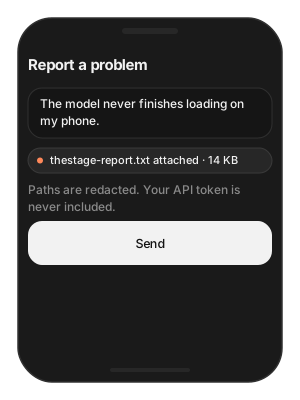
func sendDiagnostics() async {
    let report = await TheStageAI.debugReport(app_header: "MyApp 2.3.1")
    // your support SDK
    ticket.attach(text: report, name: "thestage-report.txt")
}
// Capture `flutter run` / device console output for the session,
// or expose the Swift debugReport() through a small platform call
// in your runner.
Attention
The report redacts file paths and never contains the API token.
Ask for the report, never for the user’s token.
Route SDK logs into your own logger
Problem
Building — an app that already ships logs to a backend with its own levels.
Users want — SDK output in the same stream, same format.
Hard part — two loggers writing to the console is noise; the
SDK’s .debug level is per-chunk verbose.
Solution — what to use
TSLogSink— implementlog(level:category:event:message:).TheStageAI.set_developer_log_sink(...)andTheStageAI.log_level = .info— ship with.infoor higher.Flutter: native-side only; install in the iOS runner.
struct MySink: TSLogSink {
func log(level: TSLogLevel, category: String, event: String, message: String) {
AppLogger.shared.write(
level: level.rawValue,
"[TheStage/\(category)] \(event): \(message)"
)
}
}
TheStageAI.set_developer_log_sink(MySink())
TheStageAI.log_level
= .info
// Native-side only; install the sink in the iOS runner.
Attention
.debugis verbose (per-chunk timings). Ship with.infoor higher.
Troubleshooting
Symptom |
Cause |
Fix |
|---|---|---|
No SDK lines in the console |
Level too high, or no sink. |
|
Log file is empty |
|
Call it, then read the returned URL. |