Voice Agent
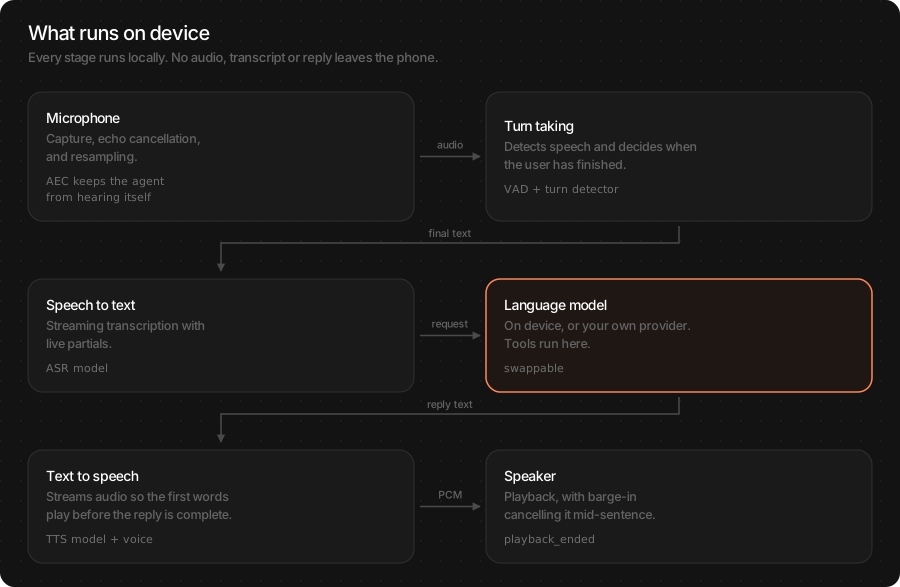
A full voice conversation on device, driven by one object. The agent listens through the microphone, decides when the user has finished, gets a reply from a language model, speaks it, and lets the user interrupt at any point. Every stage runs locally — no audio, transcript or reply leaves the phone.
You choose the language model: an on-device pack for a fully offline assistant, or your own OpenAI-compatible endpoint. Everything else stays the same.
Main features
Full duplex: the user can interrupt mid-reply and the agent stops speaking.
Fully on device: microphone, transcription, reply and speech all run locally.
Bring your own LLM: on-device by default, or route replies to your provider without changing the rest.
Typed streams: live captions, final transcripts, reply text and speech level each on their own channel — a chat UI never parses a blob.
Tool calling: the same
[Tool]closures as the LLM page, run between turns and surfaced as events.Streaming speech: the first words play before the reply is complete.
Echo cancellation: the agent does not hear itself, so barge-in works on a speaker as well as headphones.
In this page
Here we will cover the following topics:
Supported models: which packs the agent accepts for each stage, and the LLM choice.
Quick start: an offline assistant, or one on your own LLM — Swift and Flutter side by side.
Follow the conversation: states, streams and events, and which to use for what.
Configure the agent: the knobs people change, with defaults, and which apply live.
Usage Guides: offline assistant, chat UI with captions, barge-in, turn-taking, tools, voices, custom nodes.
Troubleshooting: symptom → cause → fix.
Load Progress / Prefetch: first-run download of four packs, and warming them on a splash screen.
Supported models
The agent is four stages; each accepts the packs from its own page.
Stage |
Packs |
Notes |
|---|---|---|
Voice detection |
|
Always on device. |
Speech to text |
|
TheWhisper for live captions; see ASR (Speech-to-Text). |
Language model |
|
Local packs run tools; Gemma3 does not. See LLM (Language Model). |
Text to speech |
|
Voices and languages per TTS (Text-to-Speech). |
Turn detection (optional) |
|
Neural end-of-turn; tolerates mid-sentence pauses. |
Speaker ID (optional) |
|
Respond only to an enrolled voice; see Speaker embedding. |
Which LLM?
You need… |
Pick |
Why |
|---|---|---|
Works with no network; private by design |
On-device ( |
Qwen3-0.6B or LFM2.5-350M; tools included. |
Best answer quality, network is fine |
Your endpoint ( |
Any OpenAI-compatible chat API. Tools are the provider’s. |
Lowest latency to first word |
On-device, LFM2.5-230M |
No round trip; first token in tens of milliseconds. |
Quick start
Two ways to run the agent. They differ only in where the reply comes from.
You want |
Network |
LLM |
|---|---|---|
A fully offline assistant |
none after first download |
|
Your own model behind an API |
required |
|
Fully offline
import TheStageSDK

try await TheStageAI.shared.initialize(api_token: "your-api-token")

// 1. Load the language model under a handle
try await TheStageAI.shared.start_model(
    model_name: "llm",
    engines_path: "TheStageAI/Qwen3-0.6B"
)

// 2. Point the agent at that handle
let llm = TSLocalLLMProvider(
    model_path: "llm",
    // weather, time, search — or []
    tools: DefaultTools.live,
    system_prompt: DefaultTools.voice_system_prompt
)
var config = TSAgentConfig(
    vad: "TheStageAI/silero-vad",
    stt: "TheStageAI/thewhisper-large-v3-turbo",
    tts: "TheStageAI/neutts-nano-multilingual",
    llm: llm
)
config.tts_voice = "dave"

// 3. Subscribe, then start
let agent = TSVoiceAgent(config: config)
Task {
    for await text in agent.transcripts.recv() { chat.addUser(text) }
}
Task {
    for await delta in agent.llm_deltas.recv() { chat.appendAssistant(delta) }
}

// listening from here
try await agent.start()
import 'package:thestage_apple_sdk/thestage_apple_sdk.dart';

await TheStageFlutterSDK.initialize(api_token: 'your-api-token');

// 1. Load the language model under a handle
await TheStageFlutterSDK.start_model(
  model_name: 'llm',
  engines_path: 'TheStageAI/Qwen3-0.6B',
);

// 2 + 3. Subscribe, then start with the same handle
final agent = TSVoiceAgent();
agent.transcripts.listen(chat.addUser);
agent.llm_deltas.listen(chat.appendAssistant);

await agent.start(config: {
  'vad': 'TheStageAI/silero-vad',
  'stt': 'TheStageAI/thewhisper-large-v3-turbo',
  'tts': 'TheStageAI/neutts-nano-multilingual',
  'tts_voice': 'dave',
  'llm_provider': 'local',
  // the start_model handle
  'llm_model': 'llm',
  // none | voice | web | phone
  'llm_tools': 'voice',
// listening from here
});
Your own LLM endpoint
let llm = TSOpenAICompatibleProvider(
    endpoint: "https://api.openai.com/v1/chat/completions",
    api_key: "sk-YOUR-KEY",
    model: "gpt-4o-mini"
)
var config = TSAgentConfig(
    vad: "TheStageAI/silero-vad",
    stt: "TheStageAI/thewhisper-large-v3-turbo",
    tts: "TheStageAI/neutts-nano-multilingual",
    llm: llm
)
config.system_prompt = "You are a concise voice assistant."

let agent = TSVoiceAgent(config: config)
try await agent.start()
final agent = TSVoiceAgent();
await agent.start(config: {
  'vad': 'TheStageAI/silero-vad',
  'stt': 'TheStageAI/thewhisper-large-v3-turbo',
  'tts': 'TheStageAI/neutts-nano-multilingual',
  'llm_provider': 'openai_compatible',
  'llm_endpoint': 'https://api.openai.com/v1/chat/completions',
  'llm_api_key': 'sk-YOUR-KEY',
  'llm_model': 'gpt-4o-mini',
  'system_prompt': 'You are a concise voice assistant.',
});
Attention
Subscribe before start(). Streams attached afterwards miss the
first turn. And one running agent per microphone — call stop()
before starting another.
Important API
Purpose |
Swift |
Flutter |
|---|---|---|
Build |
|
|
Run |
|
|
Mic on / off |
|
|
Text in, voice out |
|
|
Cut playback |
|
|
Voice |
|
|
Memory |
|
|
Live re-tune |
|
|
Follow the conversation
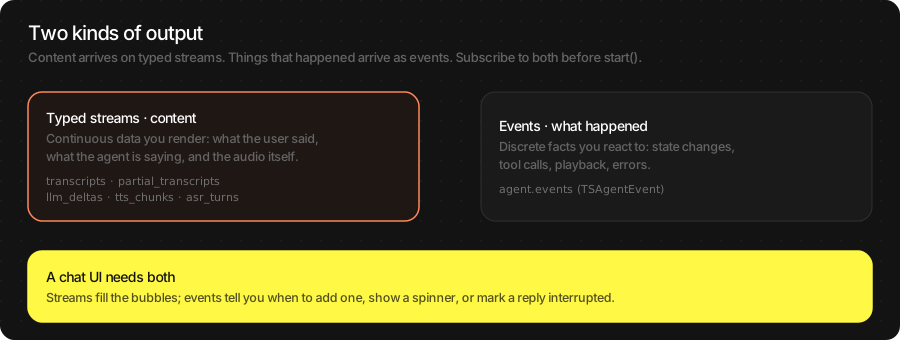
The agent gives you two kinds of output. Streams carry content you render — what the user said, what the assistant is saying. Events tell you what happened — a state change, a tool call, playback ending, an error. A chat UI needs both.
// "llm" is the handle you gave start_model in Quick start
let llm = TSLocalLLMProvider(
    model_path: "llm",
    tools: DefaultTools.live,
    system_prompt: DefaultTools.voice_system_prompt
)
var config = TSAgentConfig(
    vad: "TheStageAI/silero-vad",
    stt: "TheStageAI/thewhisper-large-v3-turbo",
    tts: "TheStageAI/neutts-nano-multilingual",
    llm: llm
)
let agent = TSVoiceAgent(config: config)

// Content
Task { for await p in agent.partial_transcripts.recv() { caption.text = p } }
Task { for await t in agent.transcripts.recv()         { chat.addUser(t) } }
Task {
    for await d in agent.llm_deltas.recv() { chat.appendAssistant(d) }
}
Task {
    for await level in agent.tts_levels.recv() { avatar.mouth = level }
}

// What happened
Task {
    for await event in agent.events {
        switch event.kind {
        case .state_changed:
            statusLabel.text = event.data["state"] as? String
        case .response_done:
            if event.data["interrupted"] as? Bool == true {
                chat.markInterrupted()
            }
        case .tool_started:
            chip.show(event.data["name"] as? String ?? "")
        case .error:
            banner.show(event.data["message"] as? String ?? "")
        default: break
        }
    }
}
// agent as in Quick start; agentConfig is its model map
final agent = TSVoiceAgent();

// Content
agent.transcripts.listen(chat.addUser);
agent.llm_deltas.listen(chat.appendAssistant);
agent.tts_levels.listen((level) => avatar.mouth = level);

// What happened (live captions arrive here on Flutter)
agent.events.listen((e) {
  final data = (e['data'] as Map?)?.cast<String, dynamic>() ?? {};
  switch (e['kind']) {
    case 'user_request_partial': caption.value = data['text'] as String? ?? '';
    case 'state_changed':        status.value  = data['state'] as String? ?? '';
    case 'response_done':
      if (data['interrupted'] == true) chat.markInterrupted();
    case 'tool_started':         chip.show(data['name'] as String? ?? '');
    case 'error':                banner.show(data['message'] as String? ?? '');
  }
});
Agent states
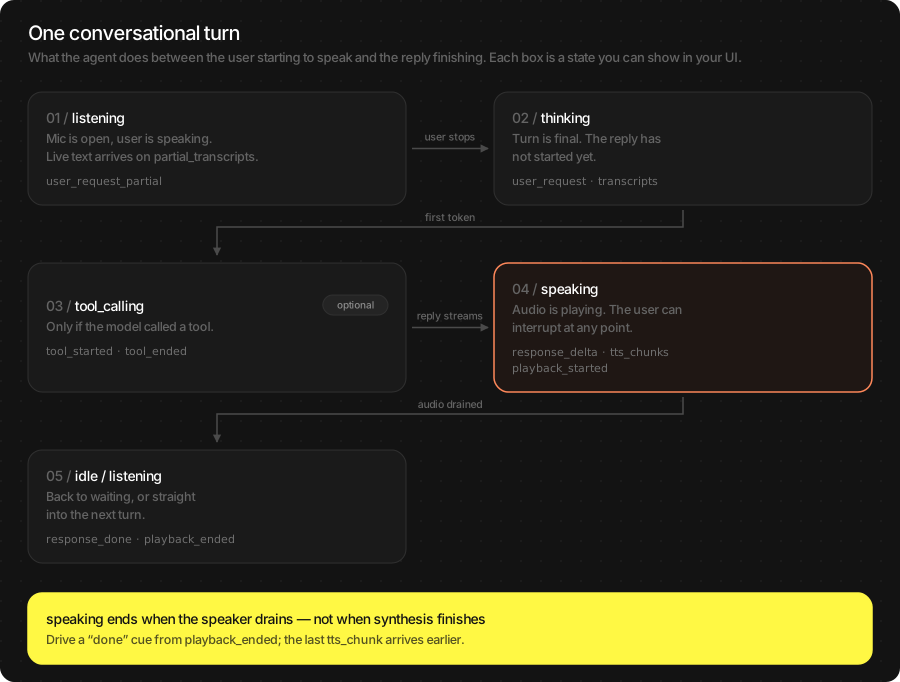
The agent is always in exactly one state; state_changed fires on
every move.
State |
Means |
Typical UI |
|---|---|---|
|
Not listening |
“Tap to talk” |
|
Packs are loading |
Progress |
|
Mic open, capturing speech |
Mic active, live caption |
|
Turn committed, reply not started |
Spinner |
|
Running a tool |
“Looking that up…” |
|
Playing the reply |
Waveform, tap to interrupt |
|
Waiting for a wake word |
Dimmed mic |
Note
speaking ends when the speaker has drained, not when synthesis
finishes. A “done” cue driven by playback_ended is accurate; one
driven by the last text delta fires early.
Streams
Carries |
Swift |
Flutter |
|---|---|---|
Live user text while speaking |
|
|
Final user text |
|
|
Assistant text, token by token |
|
|
Speech level, for an avatar |
|
|
Mic level, for a meter |
|
|
Synthesised audio (PCM) |
|
— |
Events
All arrive on events with kind and a data payload.
Kind |
Payload |
Fires when |
|---|---|---|
|
|
Any move between the states above. |
|
|
Live transcript while the user speaks. |
|
|
The user’s turn is final. |
|
|
Each chunk of the reply (same as |
|
|
Reply finished — check |
|
|
A tool call begins / returns. |
|
— / |
First audio reaches the speaker / speaker drained or cut by barge-in. |
|
— |
The wake word was heard (wake-word mode). |
|
|
A recoverable or terminal failure. |
Warning
response_done and playback_ended fire on a clean finish and
on a barge-in. interrupted / reason tell them apart. Logging a
turn as complete without checking is the most common source of wrong
analytics.
Configure the agent
Everything lives on TSAgentConfig (Swift) or the start map
(Flutter). The defaults ship a working assistant; these are the fields
people change, grouped by what they affect. Unless marked live, a
change needs stop() then start().
var config = TSAgentConfig(
    vad: vadRepo,
    stt: sttRepo,
    tts: ttsRepo,
    llm: llm
)

// Reply
config.system_prompt = "You are Acme's assistant. Be brief."
config.max_tokens = 256
config.chat_memory = AgentMessageSlidingWindowMemory(max_turns: 10)

// Voice
// or tts_voice_dir / tts_language
config.tts_voice = "dave"

// Turn taking
// hush that ends a turn (VAD mode)
config.silence_timeout_ms = 608
// neural end-of-turn instead
config.turn_end_mode = .dnn
config.turn_detector = "TheStageAI/smart-turn-v3"

// Barge-in
// iOS default; .none on Mac speakers
config.interrupt_mode = .vad
config.interrupt_min_speech_ms = 600

// Audio
config.audio.sample_rate_out = 48_000
config.audio.aec_method = .VPIO

// Start muted, open the mic later
config.auto_listen = false
// agent as in Quick start; agentConfig is its model map
final agent = TSVoiceAgent();

await agent.start(config: {
  'vad': vadRepo, 'stt': sttRepo, 'tts': ttsRepo,
  'llm_provider': 'local', 'llm_model': 'llm',

  // Reply
  'system_prompt': "You are Acme's assistant. Be brief.",
  'max_tokens': 256,
  'chat_memory_max_turns': 10,

  // Voice
  // or tts_voice_dir / tts_language
  'tts_voice': 'dave',

  // Turn taking
  'silence_timeout_ms': 608,
  'turn_end_mode': 'dnn',
  'turn_detector': 'TheStageAI/smart-turn-v3',

  // Barge-in
  'interrupt_mode': 'vad',
  'interrupt_min_speech_ms': 600,

  // Audio
  'sample_rate_out': 48000,
  'aec_method': 'vpio',

  'auto_listen': false,
});
Field |
Default |
Live? |
Change it when |
|---|---|---|---|
|
voice default |
yes ( |
Persona, brand, scope. Keep it short — paid on every turn. |
|
256 |
no |
Replies get cut off — raise. Spoken replies rarely need more. |
|
sliding window |
no |
Long sessions on small packs run out of context — lower. |
|
pack default |
yes ( |
See TTS (Text-to-Speech) for voices and packs. |
|
608 |
no |
Cuts users off mid-thought — raise to 1 000–1 500. Feels slow — lower. |
|
|
no |
Users pause mid-sentence — |
|
0.85 |
yes ( |
DNN mode: lower to commit sooner, raise to wait longer. |
|
iOS |
yes ( |
|
|
600 |
yes |
Snappier barge-in — lower (more false triggers); twitchy — raise. |
|
0.5 |
no |
Starts on background noise — raise; misses quiet users — lower. |
|
true |
no |
Start muted and open the mic with |
|
see Audio Nodes |
no |
Speaker rate, echo cancellation, custom audio source. |
Usage Guides
Each guide is one production question: what you are building, what to use, the code, and what not to forget.
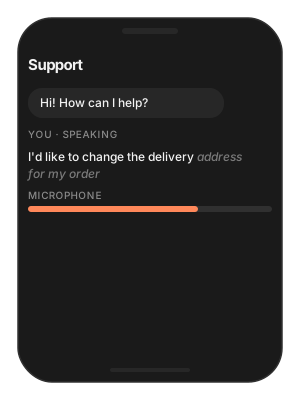
A chat screen with live captions
Problem
Building — a support app that shows the conversation as bubbles.
Users want — to see their words while they speak, watch them settle when they finish, and see the reply stream in — with a mic meter and a speaking avatar.
Hard part — five things update at once and each comes from a different stream; subscribing late loses the first events.
Solution — what to use
agent.partial_transcripts— the growing caption;agent.transcripts— the settled user bubble.agent.llm_deltas— the assistant bubble, appended.agent.vad_probabilities— mic meter;agent.tts_levels— avatar.agent.events.response_done— markinterrupted.Subscribe to all of them before
agent.start().
// "llm" is the handle you gave start_model in Quick start
let llm = TSLocalLLMProvider(
    model_path: "llm",
    tools: DefaultTools.live,
    system_prompt: DefaultTools.voice_system_prompt
)
var config = TSAgentConfig(
    vad: "TheStageAI/silero-vad",
    stt: "TheStageAI/thewhisper-large-v3-turbo",
    tts: "TheStageAI/neutts-nano-multilingual",
    llm: llm
)

let agent = TSVoiceAgent(config: config)

// grows while the user speaks
Task {
    for await p in agent.partial_transcripts.recv() { caption.text = p }
}
Task {
    for await t in agent.transcripts.recv() {
        chat.append(.user(t)); caption.text = ""
    }
}
Task {
    for await d in agent.llm_deltas.recv() { chat.appendToLastAssistant(d) }
}
Task {
    for await p in agent.vad_probabilities.recv() { micMeter.level = p }
}
Task {
    for await l in agent.tts_levels.recv() { avatar.mouth = l }
}
Task {
    for await e in agent.events where e.kind == .response_done {
        chat.finishAssistant(interrupted: e.data["interrupted"] as? Bool ?? false)
    }
}

try await agent.start()
final agent = TSVoiceAgent();

agent.transcripts.listen((t) { chat.append(User(t)); caption.value = ''; });
agent.llm_deltas.listen(chat.appendToLastAssistant);
agent.vad_probabilities.listen((p) => micMeter.value = p);
agent.tts_levels.listen((l) => avatar.mouth = l);
agent.events.listen((e) {
  final data = (e['data'] as Map?)?.cast<String, dynamic>() ?? {};
  if (e['kind'] == 'user_request_partial') {
    caption.value = data['text'] as String? ?? '';
  }
  if (e['kind'] == 'response_done') {
    chat.finishAssistant(interrupted: data['interrupted'] == true);
  }
});

await agent.start(config: agentConfig);
Attention
Start a new assistant bubble on
user_request, not on the first delta — otherwise a tool call that produces no text leaves an empty bubble.Mark the bubble on
response_donewithinterrupted == trueso the user sees the reply was cut.asr_streamingis on by default; captions need it.
The agent interrupts itself
Problem
Building — an assistant on a Mac with built-in speakers, or an iPhone in speaker mode.
Users want — the assistant to finish its sentence instead of hearing itself and stopping.
Hard part — echo cancellation is per audio route: solid on iOS with VPIO, unreliable on Mac speakers.
Solution — what to use
iOS:
config.audio.aec_method = .VPIO+interrupt_mode = .vad+interrupt_min_speech_ms = 800.macOS speakers:
interrupt_mode = .noneandaec_method = .NONE— or ask for headphones.agent.update_interrupt_config(mode:min_speech_ms:)— live, when a headphone is plugged in.aec_warmup_ms— if only the first reply self-interrupts.
// "llm" is the handle you gave start_model in Quick start
let llm = TSLocalLLMProvider(
    model_path: "llm",
    tools: DefaultTools.live,
    system_prompt: DefaultTools.voice_system_prompt
)
var config = TSAgentConfig(
    vad: "TheStageAI/silero-vad",
    stt: "TheStageAI/thewhisper-large-v3-turbo",
    tts: "TheStageAI/neutts-nano-multilingual",
    llm: llm
)
let agent = TSVoiceAgent(config: config)

#if os(macOS)
// no barge-in on Mac speakers
config.interrupt_mode = .none
config.audio.aec_method = .NONE
#else
config.interrupt_mode = .vad
config.audio.aec_method = .VPIO
// ignore short blips
config.interrupt_min_speech_ms = 800
#endif

// Live, after a headphone plug-in event:
await agent.update_interrupt_config(mode: .speech_only, min_speech_ms: 600)
// agent as in Quick start; agentConfig is its model map
final agent = TSVoiceAgent();

await agent.start(config: {
  ...agentConfig,
  'interrupt_mode': Platform.isMacOS ? 'none' : 'vad',
  'aec_method':     Platform.isMacOS ? 'none' : 'vpio',
  'interrupt_min_speech_ms': 800,
});
Attention
Self-interruption only on the first reply: raise
aec_warmup_msso AEC has a reference before the first sentence.mute_mic_during_playbackis the fallback for routes with no AEC; it disables barge-in while speaking.Full route table: Audio Nodes.
It cuts users off — or waits too long
Problem
Building — a dictation-heavy assistant.
Users want — to pause and think mid-sentence without being answered; and to get a reply promptly after a clear question.
Hard part — turn ending is a policy, not a constant: a silence timer and a model that understands pauses make opposite trade-offs.
Solution — what to use
turn_end_mode = .dnn+turn_detector = "TheStageAI/smart-turn-v3"+turn_eot_threshold— for thinkers.turn_end_mode = .vad+silence_timeout_ms = 450— for quick commands.agent.update_turn_config(eot_threshold:)— live re-tune.turn_max_silence_ms— the hard stop in DNN mode.
// "llm" is the handle you gave start_model in Quick start
let llm = TSLocalLLMProvider(
    model_path: "llm",
    tools: DefaultTools.live,
    system_prompt: DefaultTools.voice_system_prompt
)
var config = TSAgentConfig(
    vad: "TheStageAI/silero-vad",
    stt: "TheStageAI/thewhisper-large-v3-turbo",
    tts: "TheStageAI/neutts-nano-multilingual",
    llm: llm
)
let agent = TSVoiceAgent(config: config)

// Thinkers: neural end-of-turn
config.turn_end_mode = .dnn
config.turn_detector = "TheStageAI/smart-turn-v3"
// lower → commits sooner
config.turn_eot_threshold = 0.85

// Quick commands: plain silence timer, shorter
config.turn_end_mode = .vad
// default 608
config.silence_timeout_ms = 450

// Live re-tune in DNN mode
await agent.update_turn_config(eot_threshold: 0.7)
// Thinkers
{'turn_end_mode': 'dnn', 'turn_detector': 'TheStageAI/smart-turn-v3',
 'turn_eot_threshold': 0.85}

// Quick commands
{'turn_end_mode': 'vad', 'silence_timeout_ms': 450}
Attention
.dnnloads one extra small pack; budget it in the first-run download.turn_max_silence_ms(2 000) is the hard stop in DNN mode: the agent commits after that much hush no matter what the model thinks.“Starts turns on noise” is
vad_threshold, not turn policy.
Let the assistant do things
Problem
Building — a retail voice assistant.
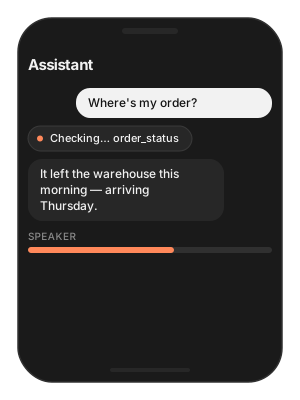
Users want — “call the store”, “what’s the weather”, “where’s my order” — done, with a short spoken filler while it works.
Hard part — the model must act between turns, speak only text, and tell the UI what it is doing.
Solution — what to use
Tool(name:description:parameters:execute:)— your functions;descriptionsays when to call.DefaultTools.phone— dial / maps / SMS via system UI.TSLocalLLMProvider(model_path:tools:system_prompt:)withDefaultTools.voice_system_prompt.agent.events.tool_started/.tool_ended— show a chip.Flutter:
'llm_tools': 'voice' | 'web' | 'phone'from the built-in catalog.
var config = TSAgentConfig(
    vad: "TheStageAI/silero-vad",
    stt: "TheStageAI/thewhisper-large-v3-turbo",
    tts: "TheStageAI/neutts-nano-multilingual",
    llm: llm
)
let agent = TSVoiceAgent(config: config)

let orderStatus = Tool(
    name: "order_status",
    description: "Delivery status for an order number. "
               + "Use when the user asks where an order is.",
    parameters: ["type": "object",
                 "properties": ["order_id": ["type": "string"]],
                 "required": ["order_id"]],
    execute: { call in
        let id = call.arguments["order_id"] as? String ?? ""
        // your API client; returns a short JSON string
        return try await orders.statusJSON(for: id)
    }
)

let llm = TSLocalLLMProvider(
    model_path: "llm",
    // yours + dial / maps / sms
    tools: [orderStatus] + DefaultTools.phone,
    system_prompt: DefaultTools.voice_system_prompt + "\nYou help Acme customers."
)

Task {
    for await e in agent.events {
        if e.kind == .tool_started { chip.show(e.data["name"] as? String ?? "") }
        if e.kind == .tool_ended   { chip.hide() }
    }
}
// agent as in Quick start; agentConfig is its model map
final agent = TSVoiceAgent();

await agent.start(config: {
  ...agentConfig,
  'llm_provider': 'local',
  'llm_model': 'llm',
  // built-in catalog: none | voice | web | phone
  'llm_tools': 'voice',
});
agent.events.listen((e) {
  if (e['kind'] == 'tool_started') chip.show((e['data'] as Map)['name'] as String);
  if (e['kind'] == 'tool_ended')   chip.hide();
});
Attention
Phone tools open system UI with fields prefilled; the user confirms the call or message. The voice system prompt already explains that to the model.
Only text is ever spoken; tool payloads never reach TTS.
Custom tools are Swift today; Flutter selects from the built-in catalog. Tool authoring: LLM (Language Model).
Change the voice from a settings screen
Problem
Building — an assistant with a settings screen.
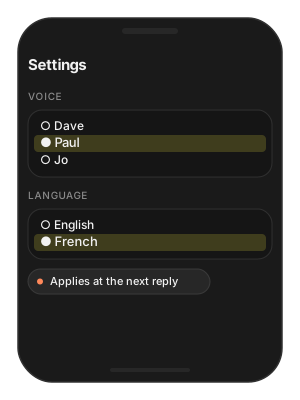
Users want — pick a voice and a language and hear the change on the next reply — no restart.
Hard part — the TTS stage has to be swapped while the agent is running.
Solution — what to use
agent.set_voice(voice_id:)/set_voice(voice_id:language:)— any subset of fields; others keep their value.agent.set_voice(voice_dir:)— your own voice pack;""goes back to the bundle voice.Do it between turns, not mid-reply.
// "llm" is the handle you gave start_model in Quick start
let llm = TSLocalLLMProvider(
    model_path: "llm",
    tools: DefaultTools.live,
    system_prompt: DefaultTools.voice_system_prompt
)
var config = TSAgentConfig(
    vad: "TheStageAI/silero-vad",
    stt: "TheStageAI/thewhisper-large-v3-turbo",
    tts: "TheStageAI/neutts-nano-multilingual",
    llm: llm
)
let agent = TSVoiceAgent(config: config)

// bundle voice
await agent.set_voice(voice_id: "paul")
// NeuTTS language
await agent.set_voice(
    voice_id: "paul",
    language: "french"
)
// your own voice pack
await agent.set_voice(voice_dir: packURL.path)
// back to the bundle voice
await agent.set_voice(voice_dir: "")
// agent as in Quick start; agentConfig is its model map
final agent = TSVoiceAgent();

await agent.set_voice(voice_id: 'paul');
await agent.set_voice(voice_id: 'paul', language: 'french');
// a voice pack copied out of assets to a real folder
final packDir = await copyAssetFolder('VoicePacks/acme');
await agent.set_voice(voice_dir: packDir.path);
Attention
The swap reloads the TTS stage — fast, not free. Do it between turns, not mid-reply.
Building a voice pack from a reference clip: TTS (Text-to-Speech).
Greet the user before listening
Problem
Building — an assistant that says hello on launch.
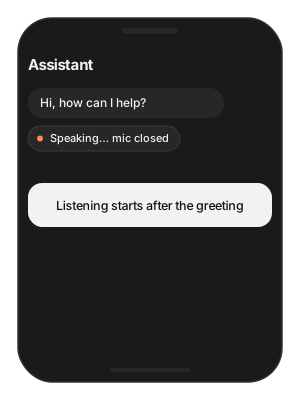
Users want — “Hi, how can I help?” first, then the microphone — not the greeting transcribed as their first request.
Hard part — the mic must stay closed until the greeting has fully played.
Solution — what to use
config.auto_listen = false— start without opening the mic.agent.say(text)— TTS only, no LLM turn, nothing in history.agent.events.playback_ended→agent.begin_listening().send_request(text)is the other direction: typed question, spoken reply.
// "llm" is the handle you gave start_model in Quick start
let llm = TSLocalLLMProvider(
    model_path: "llm",
    tools: DefaultTools.live,
    system_prompt: DefaultTools.voice_system_prompt
)
var config = TSAgentConfig(
    vad: "TheStageAI/silero-vad",
    stt: "TheStageAI/thewhisper-large-v3-turbo",
    tts: "TheStageAI/neutts-nano-multilingual",
    llm: llm
)

config.auto_listen = false
let agent = TSVoiceAgent(config: config)

Task {
    for await e in agent.events where e.kind == .playback_ended {
        // mic opens after the greeting drains
        try? await agent.begin_listening()
        break
    }
}
try await agent.start()
agent.say("Hi, how can I help?")
// agent as in Quick start; agentConfig is its model map
final agent = TSVoiceAgent();

await agent.start(config: {..., 'auto_listen': false});
final sub = agent.events.listen((e) async {
  if (e['kind'] == 'playback_ended') { await agent.begin_listening(); }
});
await agent.say('Hi, how can I help?');
Attention
sayis TTS only — no LLM turn, nothing added to history.send_request(text)is the other direction: a typed question that gets a spoken reply.
Add your own stage to the pipeline
Problem
Building — an assistant that captions what the camera sees on request, or logs every turn to analytics.
Users want — features that run inside the conversation, in step with its states.
Hard part — heavy work at the wrong moment — loading a model while TTS streams — causes audible stutter.
Solution — what to use
TSAgentNodesubclass —subscribe()to the event bus inon_start().run_when— the states it may run in; empty means always; gate heavy work toidle/listening.config.extra_nodes = [node]— keep the instance; the agent does not hand it back.Flutter:
TSAgentNodewithrunWhen/onEvent, passed asextra_nodes:.
// "llm" is the handle you gave start_model in Quick start
let llm = TSLocalLLMProvider(
    model_path: "llm",
    tools: DefaultTools.live,
    system_prompt: DefaultTools.voice_system_prompt
)
var config = TSAgentConfig(
    vad: "TheStageAI/silero-vad",
    stt: "TheStageAI/thewhisper-large-v3-turbo",
    tts: "TheStageAI/neutts-nano-multilingual",
    llm: llm
)

final class TurnLogger: TSAgentNode {
    // always
    override var run_when: Set<TSAgentState> { [] }
    override func on_start() async throws {
        guard let bus = subscribe() else { return }
        Task { for await event in bus { analytics.log(event) } }
    }
}

config.extra_nodes = [TurnLogger(id: "turn_logger")]
let agent = TSVoiceAgent(config: config)
try await agent.start()
// agent as in Quick start; agentConfig is its model map
final agent = TSVoiceAgent();

class TurnLogger extends TSAgentNode {
  @override final String id = 'turn_logger';
  // always
  @override final List<String> runWhen = const [];
  @override
  Future<void> onEvent(AgentNodeContext ctx, Map<String, dynamic> e) async {
    analytics.log(e);
  }
}

final logger = TurnLogger();
await agent.start(config: agentConfig, extra_nodes: [logger]);
Attention
Gate heavy work with
run_whenon quiet states (idle,listening); loading a model while TTS streams causes stutter.A complete camera-captioning node with VLM, including memory management, is in
examples/voice_agent_custom_nodesin the AppleSDK repo.Vision specifics: VLM (Vision-Language Model).
Troubleshooting
Symptom |
Cause |
Fix |
|---|---|---|
Agent interrupts itself |
No working echo cancellation on this route. |
iOS |
Cuts the user off |
Silence timer too short for this speaker. |
Raise |
Replies too slowly |
Waiting too long for end of turn. |
Lower |
Never leaves |
First-run download, or a pack failed. |
Prefetch on a splash screen; watch |
Silence forever |
Mic permission, or |
Check permission; call |
Offline LLM never answers |
|
Use the same string; await |
Playback too fast / slow |
|
Set it to your session’s rate. |
Barge-in never triggers |
|
|
Turn logged as complete when it was cut |
Ignoring |
Read the payload. |
Load Progress / Prefetch
First start() downloads and prepares up to four packs. Show
progress, and warm them on a splash screen so the first conversation
starts instantly.
// "llm" is the handle you gave start_model in Quick start
let llm = TSLocalLLMProvider(
    model_path: "llm",
    tools: DefaultTools.live,
    system_prompt: DefaultTools.voice_system_prompt
)
var config = TSAgentConfig(
    vad: "TheStageAI/silero-vad",
    stt: "TheStageAI/thewhisper-large-v3-turbo",
    tts: "TheStageAI/neutts-nano-multilingual",
    llm: llm
)

// Progress for every pack the agent loads
config.on_load_progress = { p in
    print("[\(p.model)] \(p.phase) \(Int(p.fraction * 100))%")
}

// Warm on a splash screen
for repo in ["TheStageAI/silero-vad",
             "TheStageAI/thewhisper-large-v3-turbo",
             "TheStageAI/neutts-nano-multilingual",
             "TheStageAI/Qwen3-0.6B"] {
    _ = try await TheStageAI.shared.prefetch_engines(repo_id: repo)
}
TheStageFlutterSDK.on_progress.listen((e) =>
  print('[${e['model_name']}] ${e['phase']} '
        '${((e['progress'] ?? 0) * 100).round()}%'));

for (final repo in ['TheStageAI/silero-vad',
                    'TheStageAI/thewhisper-large-v3-turbo',
                    'TheStageAI/neutts-nano-multilingual',
                    'TheStageAI/Qwen3-0.6B']) {
  await TheStageFlutterSDK.prefetch_engines(repo_id: repo);
}
Teardown: await agent.stop(). If you start_model’d a local LLM,
also stop_model that handle. Full contract: TheStage Apple SDK
(Load Progress).