VAD (Voice Activity Detection)
Tells you whether a slice of audio contains speech. Use it to gate a microphone so ASR only runs on words, to find the spoken parts of a recording, or to drive a “listening” indicator. It is small, fast, and runs on every 32 ms frame.
Most apps never call it directly: the Voice Agent and
ASREngine(config:) already run VAD internally. Reach for it when you
own the audio pipeline yourself.
Main features
Per-frame speech probability: one number in
[0, 1]for every 512-sample frame at 16 kHz.Stable start / end decisions:
VADActivitySessionturns noisy frame scores into clean speech-started / speech-ended states.Batch segmentation: pass a whole recording and get speech regions back as sample ranges.
Tunable sensitivity: one threshold, plus padding and minimum silence.
Same output on Swift and Flutter through the JSON path.
In this page
Here we will cover the following topics:
Supported models: Silero VAD.
Quick start: score a frame, or segment a recording — Swift and Flutter side by side.
Detect speech live: frame scoring, the activity session, and the sensitivity knobs.
Segment a recording: batch mode and its options.
Result object: what comes back in each mode.
Usage Guides: gate the mic before ASR, a listening indicator, trim silence from voice notes, false triggers in noise.
Troubleshooting: symptom → cause → fix.
Cleanup: releasing the model.
Supported models
Model |
HF repo |
Notes |
|---|---|---|
Silero VAD |
|
16 kHz, 512-sample frames (32 ms). Keeps state across frames. |
Quick start
Two modes. Live: feed frames as they arrive and read a probability per frame. Batch: hand over a whole clip and get the speech regions.
You want |
Input |
Use |
|---|---|---|
Is the user speaking right now? |
one 512-sample frame at a time |
|
Where is the speech in this recording? |
the whole clip |
|
Score a frame
import TheStageSDK

try await TheStageAI.shared.initialize(api_token: "your-api-token")

let vad = try SileroVAD(
    engines_path: "TheStageAI/silero-vad"
)

// SDK microphone: 512-sample frames (32 ms) at 16 kHz
let mic = MicAudioSource(sample_rate: 16_000)
try mic.start()

// [Float], exactly 512 samples, 16 kHz
for await frame in mic.stream {
    // 0…1
    let p = vad.probe(frame)
    if p > 0.5 { print("speech") }
}
import 'package:thestage_apple_sdk/thestage_apple_sdk.dart';

await TheStageFlutterSDK.initialize(api_token: 'your-api-token');
await TheStageFlutterSDK.start_model(
  model_name: 'vad',
  engines_path: 'TheStageAI/silero-vad',
);

// Your 16 kHz mono source in 512-sample frames. For a live microphone on Flutter
// use TSASREngine — it runs VAD for you. The JSON path is for audio you already
// have; here a headerless 16 kHz float32 file.
final bytes = await File('/path/to/clip_16k.pcm').readAsBytes();
final pcm = Float32List.view(bytes.buffer);
Iterable<Float32List> frames() sync* {
  for (var i = 0; i + 512 <= pcm.length; i += 512) yield pcm.sublist(
    i,
    i + 512,
  );
}

for (final frame in frames()) {
  final rows = await TheStageFlutterSDK.infer(
    model_name: 'vad',
    input_json: {'audio': frame},
  );
  // 0…1
  final p = rows[0]['probability'] as double;
  if (p > 0.5) print('speech');
}
Segment a recording
let vad = try SileroVAD(engines_path: "TheStageAI/silero-vad")

let recording = try AudioIO.load_wav(
    path: "/path/to/recording.wav",
    target_sample_rate: 16_000
)
let regions = vad.extract_segments(audio: recording)
for r in regions {
    let clip = Array(recording[r.start..<r.end])
    print("\(Double(r.start) / 16_000)s – \(Double(r.end) / 16_000)s")
}
await TheStageFlutterSDK.start_model(
  model_name: 'vad',
  engines_path: 'TheStageAI/silero-vad',
);

final rows = await TheStageFlutterSDK.infer(
  model_name: 'vad',
  input_json: {
    // Float32List, 16 kHz mono
    'audio': recording,
    'extract_segments': true,
  },
);
for (final r in rows) {
  // sample indices
  final start = r['start'] as int, end = r['end'] as int;
  print('${start / 16000}s – ${end / 16000}s');
}
Important API
Purpose |
Swift |
Flutter |
|---|---|---|
Load |
|
|
Score a frame |
|
|
Stable start / end |
|
threshold + hold in your code |
Segment a clip |
|
|
New clip |
|
|
Release |
drop the object |
|
Detect speech live
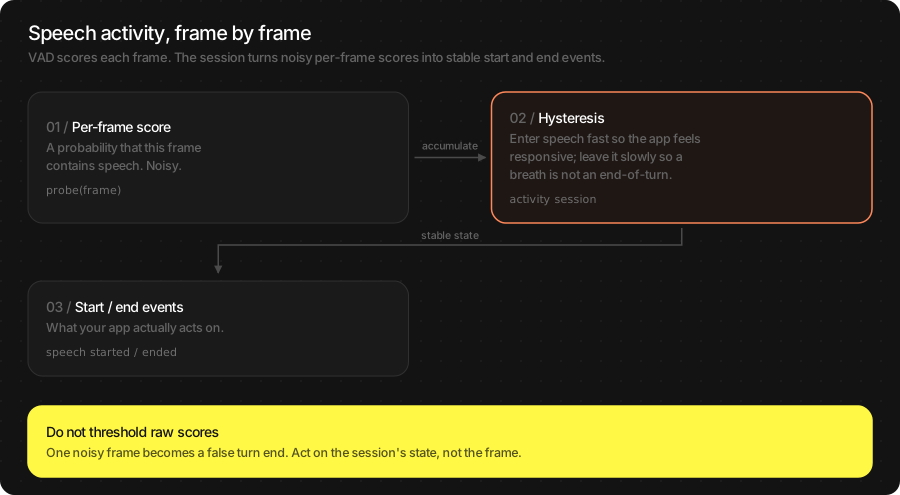
A raw per-frame probability is noisy: one loud breath scores high, one
soft syllable scores low. Acting on single frames gives you turns that
start on a door click and end mid-word. VADActivitySession applies
hysteresis — enter speech quickly, leave it slowly — and gives you a
state you can act on.
let vad = try SileroVAD(engines_path: "TheStageAI/silero-vad")

var session = VADActivitySession(config: VADConfig(threshold: 0.5))

// SDK microphone: 512-sample frames (32 ms) at 16 kHz
let mic = MicAudioSource(sample_rate: 16_000)
try mic.start()

for await frame in mic.stream {
    let p = vad.probe(frame)
    _ = session.process(
        samples: frame,
        probability: p,
        sample_rate: 16_000
    )

    switch session.state {
    case .SPEECH:                          buffer.append(contentsOf: frame)
    case .SILENCE where !buffer.isEmpty:   handOff(buffer); buffer.removeAll()
    // pending states
    default:                               break
    }
}
await TheStageFlutterSDK.start_model(
  model_name: 'vad',
  engines_path: 'TheStageAI/silero-vad',
);

// No session object on Flutter: hold the decision for a few frames.
// 8 × 32 ms ≈ 250 ms
const threshold = 0.5, holdFrames = 8;
var speaking = false, quiet = 0;

// Your 16 kHz mono source in 512-sample frames. For a live microphone on Flutter
// use TSASREngine — it runs VAD for you. The JSON path is for audio you already
// have; here a headerless 16 kHz float32 file.
final bytes = await File('/path/to/clip_16k.pcm').readAsBytes();
final pcm = Float32List.view(bytes.buffer);
Iterable<Float32List> frames() sync* {
  for (var i = 0; i + 512 <= pcm.length; i += 512) yield pcm.sublist(
    i,
    i + 512,
  );
}

for (final frame in frames()) {
  final rows = await TheStageFlutterSDK.infer(
    model_name: 'vad', input_json: {'audio': frame});
  final p = rows[0]['probability'] as double;

  if (p > threshold) {
    speaking = true;
    quiet = 0;
    buffer.addAll(frame);
  }
  else if (speaking && ++quiet >= holdFrames) {
    speaking = false;
    handOff(buffer);
    buffer.clear();
  }
}
Sensitivity — VADConfig:
Field |
Default |
Change it when |
|---|---|---|
|
0.5 |
Raise to |
|
0.20 |
How much quiet ends speech. Raise for speakers who pause mid-sentence. |
|
0.35 |
Audio kept from before speech was confirmed, so the first syllable is not lost. Rarely changed. |
|
50 |
Padding around segments in batch mode. |
Note
Frames must be exactly 512 samples of 16 kHz mono float. Smaller frames are zero-padded (worse accuracy); larger ones are rejected. Set your capture buffer to 512, or re-block through a ring buffer.
Segment a recording
Batch mode runs the same detector over a whole clip and merges frames into regions. Use it to skip silence before transcription, to show where speech is on a waveform, or to trim a voice note.
let vad = try SileroVAD(engines_path: "TheStageAI/silero-vad")
var config = TSAgentConfig(
    vad: "TheStageAI/silero-vad",
    stt: "TheStageAI/thewhisper-large-v3-turbo"
)

// batch options live on config
vad.config.threshold = 0.6
vad.config.speech_pad_ms = 40
vad.config.min_silence_s = 0.3

let recording = try AudioIO.load_wav(
    path: "/path/to/recording.wav",
    target_sample_rate: 16_000
)
let regions = vad.extract_segments(audio: recording)
let speechOnly = regions.flatMap { Array(recording[$0.start..<$0.end]) }
await TheStageFlutterSDK.start_model(
  model_name: 'vad',
  engines_path: 'TheStageAI/silero-vad',
);

final rows = await TheStageFlutterSDK.infer(
  model_name: 'vad',
  input_json: {
    // Float32List, 16 kHz mono
    'audio': recording,
    'extract_segments': true,
    'threshold': 0.6,
    'speech_pad_ms': 40,
    'min_silence_duration_ms': 300,
  },
);
JSON option |
Meaning |
|---|---|
|
Probability that starts a region. |
|
Probability that ends one. Defaults to |
|
Quiet needed to split two regions. |
|
Padding added to both ends of each region. |
Result object
Mode |
Swift |
Flutter JSON |
|---|---|---|
Frame |
|
|
Segments |
|
one row per region: |
Usage Guides
Each guide is one production question: what you are building, what to use, the code, and what not to forget.
Gate the microphone before ASR
Problem
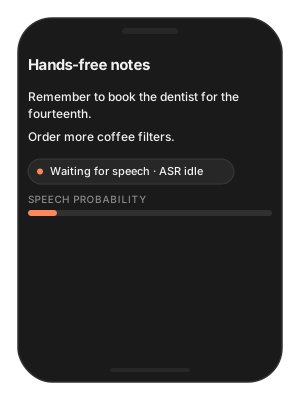
Building — a hands-free notes app that keeps the microphone open.
Users want — notes appear only for things they actually said; battery lasts the day; background chatter does not become text.
Hard part — ASR on every frame burns battery and transcribes the room; the app needs to know where speech starts and stops before it transcribes.
Solution — what to use
MicAudioSource(sample_rate: 16_000)— 512-sample frames.SileroVAD.probe(frame)— one probability per frame.VADActivitySession.process(...)— turns probabilities intoSPEECH/SILENCEstates with hysteresis.Buffer while
.SPEECH;WhisperPipeline.inferonce on the buffer when the state returns to.SILENCE.Flutter:
TSASREnginealready does this — VAD and turns built in.
let stt = try await WhisperPipeline(
    engines_path: "TheStageAI/thewhisper-large-v3-turbo"
)
let vad = try SileroVAD(engines_path: "TheStageAI/silero-vad")

var session = VADActivitySession(config: VADConfig(threshold: 0.5))
var utterance: [Float] = []

// SDK microphone: 512-sample frames (32 ms) at 16 kHz
let mic = MicAudioSource(sample_rate: 16_000)
try mic.start()

for await frame in mic.stream {
    _ = session.process(samples: frame, probability: vad.probe(frame),
                        sample_rate: 16_000)
    if session.state == .SPEECH { utterance.append(contentsOf: frame) }
    // > 200 ms
    if session.state == .SILENCE, utterance.count > 16_000 / 5 {
        let text = try stt.infer(audio: utterance,
                                 config: ASRGenerationConfig(language: "en")).text
        notes.append(text)
        utterance.removeAll()
    }
}
// Simplest correct answer on Flutter: let the SDK do this.
// VAD + turns built in
final asr = TSASREngine();
asr.transcripts.listen(notes.add);
await asr.start(config: {
  'vad': 'TheStageAI/silero-vad',
  'stt': 'TheStageAI/thewhisper-large-v3-turbo',
});
Attention
Ignore utterances under ~200 ms; they are almost always a click or a cough.
If you are on Swift and do not need custom audio,
ASREngine(config:)already does exactly this — see ASR (Speech-to-Text).Do not run a second VAD in front of
ASREngineor the Voice Agent; they have one.
A “listening” indicator
Problem
Building — any voice UI.
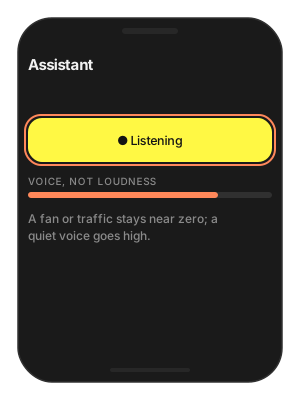
Users want — to see that the app hears them — a mic icon that reacts to their voice and not to the fridge.
Hard part — loudness meters react to fans and traffic; per-frame probabilities flicker at 30 Hz.
Solution — what to use
SileroVAD.probe(frame)onMicAudioSourceframes — probability, not level.Smooth it (
0.8 * level + 0.2 * p, ~150 ms) before driving the icon.Flutter / SDK-owned engine:
asr.vad_probabilitiesis free.
let vad = try SileroVAD(engines_path: "TheStageAI/silero-vad")

var level = 0.0
// SDK microphone: 512-sample frames (32 ms) at 16 kHz
let mic = MicAudioSource(sample_rate: 16_000)
try mic.start()

for await frame in mic.stream {
    let p = vad.probe(frame)
    // smooth, ~150 ms
    level = 0.8 * level + 0.2 * p
    micIcon.opacity = 0.3 + 0.7 * level
}
// started with asr.start(config:) as in Quick start
final asr = TSASREngine();

// With the SDK-owned engine this stream is free:
asr.vad_probabilities.listen((p) {
  level.value = 0.8 * level.value + 0.2 * p;
});
Attention
Smooth it. Raw per-frame values flicker at 30 Hz.
VAD probability ≠ loudness. A loud fan scores near zero; a quiet voice scores high. That is the point.
Trim silence from a voice note
Problem
Building — a messenger with voice messages.
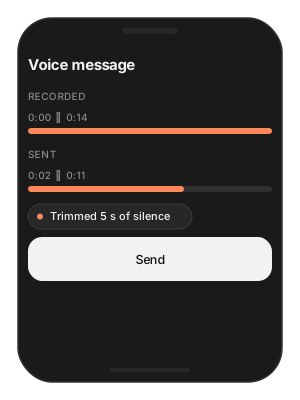
Users want — messages that start when they start talking — not two seconds of fumbling and the hunt for the stop button.
Hard part — internal pauses carry meaning and must stay; cutting too tight clips consonants.
Solution — what to use
AudioIO.load_wav(path:target_sample_rate: 16_000)— the note as[Float].vad.config.speech_pad_ms = 80— breaths sound natural.vad.extract_segments(audio:)— keep from the first region’sstartto the last region’send; one cut, pauses preserved.Flutter:
'extract_segments': trueon thevadmodel.
let vad = try SileroVAD(engines_path: "TheStageAI/silero-vad")

// keep breaths natural
vad.config.speech_pad_ms = 80
// the recording the user just made
let noteURL: URL = recorder.fileURL
let note = try AudioIO.load_wav(
    path: noteURL.path,
    target_sample_rate: 16_000
)
let regions = vad.extract_segments(audio: note)
guard let first = regions.first, let last = regions.last else { return }
// one cut, keeps mid pauses
let trimmed = Array(note[first.start..<last.end])
await TheStageFlutterSDK.start_model(
  model_name: 'vad',
  engines_path: 'TheStageAI/silero-vad',
);

// the recording the user just made, decoded to Float32List at 16 kHz
final note = await recorder.samples16k();

final rows = await TheStageFlutterSDK.infer(
  model_name: 'vad',
  input_json: {
    // Float32List, 16 kHz mono
    'audio': note,
    'extract_segments': true,
    'speech_pad_ms': 80,
  },
);
if (rows.isEmpty) return;
final trimmed = note.sublist(
  rows.first['start'] as int,
  rows.last['end'] as int,
);
Attention
Trim the ends; do not delete internal pauses — they carry meaning.
Padding of 60–100 ms sounds natural; 30 ms clips consonants.
False triggers in a noisy place
Problem
Building — an assistant used in cafés and cars.
Users want — it wakes for them, not for plates and the next table.
Hard part — other people’s speech is speech to a VAD; distance and level cannot be told apart.
Solution — what to use
VADConfig(threshold: 0.75)— quiet room 0.5; café or car 0.7–0.8; distant speakers 0.3–0.4.min_silence_sand a minimum speech duration before acting.Push-to-talk or a wake word when other voices must be excluded.
var session = VADActivitySession(config: VADConfig(
    // default 0.5
    threshold: 0.75,
    min_silence_s: 0.3
))
// default 0.5
const threshold = 0.75;
// ~250 ms before acting
const minSpeechFrames = 8;
Attention
Guidance: quiet room 0.5; café or car 0.7–0.8; distant speakers 0.3–0.4; push-to-talk 0.3.
Other people’s speech is speech to VAD. Distance and level cannot be told apart by this model; use a wake word or push-to-talk when that matters.
Troubleshooting
Symptom |
Cause |
Fix |
|---|---|---|
High probability on silence at the start of a new clip |
State carried over from the previous clip. |
|
Misses the first syllable |
Acting on the first frame above threshold. |
Use |
“Wrong chunk size” error |
Frame larger than 512 samples. |
Re-block capture to exactly 512 samples at 16 kHz. |
Triggers on noise |
Threshold too low for the environment. |
|
Transcripts of hush (“Thank you.”) |
VAD not in front of ASR. |
Gate as in the first guide, or use |
Cleanup
let ai = TheStageAI.shared

// drop the SileroVAD reference, or via the singleton:
_ = try ai.stop_model(model_name: "vad")
await TheStageFlutterSDK.start_model(
  model_name: 'vad',
  engines_path: 'TheStageAI/silero-vad',
);

await TheStageFlutterSDK.stop_model(model_name: 'vad');