Streaming
Every pipeline can deliver results while it is still working: LLM tokens as they are generated, TTS audio sentence by sentence, ASR text while the user is still talking. The perceived wait drops from seconds to milliseconds, and it uses the same model packs as batch — nothing extra to load.
This page is the one place that shows the three streams side by side and how to chain them. Each pipeline’s own page has the full API.
Main features
Same packs, no extra setup: anything you load with
start_modelalready streams.Three streams, one shape: LLM tokens, TTS audio chunks, ASR turns — all consumed with
for await/listen.Chainable: LLM tokens feed straight into a TTS stream; the first words play before the reply is finished.
Cancellable: stop any stream mid-generation when the user interrupts or leaves.
Tunable first chunk: trade a shorter first audio chunk for a faster start.
In this page
Here we will cover the following topics:
Batch or stream?: when each is right.
The three streams: LLM, TTS and ASR streaming — Swift and Flutter side by side.
Chunk reference: what each stream’s chunk carries.
Usage Guides: speak an LLM reply as it is written, cut latency to first audio, stop on interrupt.
Troubleshooting: symptom → cause → fix.
Batch or stream?
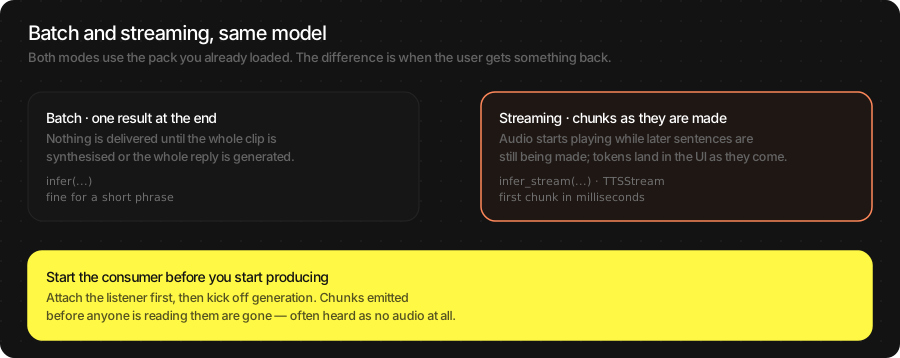
Batch ( |
Stream ( |
|
|---|---|---|
You get the result |
all at once, at the end |
piece by piece, as it is made |
Use it for |
short prompts, cached audio, tests |
anything a person is waiting on |
First output after |
the whole job |
tens of milliseconds |
Code shape |
one call, one value |
a loop you must keep draining |
Attention
Start the consumer before you start producing. The loop that reads chunks must be running before you send text or start generation. Attach it afterwards and the first chunks are gone — for TTS that means silence.
The three streams
LLM tokens
let llm = try await TSLLM(engines_path: "TheStageAI/Qwen3-0.6B")
var config = llm.generation_defaults
config.enable_thinking = false

for await chunk in llm.infer_stream(prompt: prompt, config: config) {
    if chunk.is_final { print(chunk.tokens_per_second ?? 0, "tok/s") }
    else              { bubble.text += chunk.text }
}
await TheStageFlutterSDK.start_model(
  model_name: 'llm',
  engines_path: 'TheStageAI/Qwen3-0.6B',
);

await for (final chunk in TheStageFlutterSDK.infer_stream(
  model_name: 'llm', input_json: {'prompt': prompt})) {
  if (chunk['is_final'] == true) break;
  bubble.value += chunk['delta'] as String? ?? '';
}
Full API: LLM (Language Model).
TTS audio
let tts = try await NeuTTSMultilingualPipeline(
    engines_path: "TheStageAI/neutts-nano-multilingual",
    voice_id: "dave",
    language: "english"
)

let player = AudioStreamPlayer(config: AudioStreamConfig(sample_rate: 24_000))
player.start()

let speech = tts.open_stream()
let consumer = Task {
    for await chunk in speech.output {
        if let pcm = chunk.audio { player.enqueue(pcm) }
    }
}
speech.send("A long paragraph to speak aloud.")
speech.close()
await consumer.value
await player.drain()
player.stop()
await TheStageFlutterSDK.start_model(
  model_name: 'tts',
  engines_path: 'TheStageAI/neutts-nano-multilingual',
  config: {'voice_id': 'dave', 'language': 'english'},
);

final player = TSAudioPlayer(sampleRate: 24000);
await player.start();

final speech = await TTSStream.open(model_name: 'tts');
final consumer = speech.output.listen((chunk) {
  final audio = chunk['audio'] as Float32List?;
  if (audio != null) player.enqueue(audio);
});
await speech.send('A long paragraph to speak aloud.');
await speech.close();
await consumer.asFuture();
await player.drain();
await player.stop();
Full API: TTS (Text-to-Speech).
ASR turns
let engine = ASREngine(config: TSAgentConfig(
    vad: "TheStageAI/silero-vad",
    stt: "TheStageAI/thewhisper-large-v3-turbo"))

let captions = Task {
    for await turn in engine.turns.recv() {
        committedLabel.text  = turn.committed
        hypothesisLabel.text = turn.end_of_turn ? "" : turn.hypothesis
    }
}
try await engine.start()
final asr = TSASREngine();
asr.turns.listen((turn) {
  committed.value  = turn.committed;
  hypothesis.value = turn.end_of_turn ? '' : turn.hypothesis;
});
await asr.start(config: {
  'vad': 'TheStageAI/silero-vad',
  'stt': 'TheStageAI/thewhisper-large-v3-turbo',
});
Full API: ASR (Speech-to-Text).
Important API
Stream |
Swift |
Flutter |
|---|---|---|
LLM |
|
|
TTS |
|
|
ASR |
|
|
Player |
|
|
Chunk reference
Stream |
Swift type |
Fields you use |
|---|---|---|
LLM |
|
|
LLM with tools |
|
|
TTS |
|
|
ASR |
|
|
Usage Guides
Speak an LLM reply as it is written
Problem
Building — a voice assistant whose answers come from an on-device LLM.
Users want — to hear the first sentence while the rest is still being written.
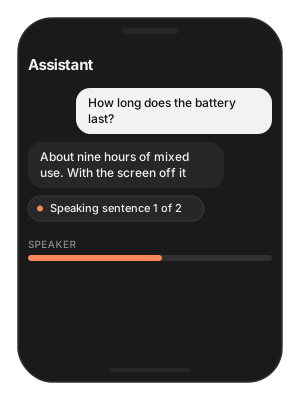
Hard part — tokens arrive one at a time and sentences must be found before they can be spoken; a consumer that starts late loses audio.
Solution — what to use
tts.open_stream()— aTTSStreamthat splits sentences itself.llm.infer_stream(prompt:config:)—sendeach token’s text into the TTS stream.AudioStreamPlayer— start the consumer ofspeech.outputbefore the firstsend.speech.close()at the end;await player.drain()before tearing down.
let llm = try await TSLLM(engines_path: "TheStageAI/Qwen3-0.6B")
let tts = try await NeuTTSMultilingualPipeline(
    engines_path: "TheStageAI/neutts-nano-multilingual",
    voice_id: "dave",
    language: "english"
)

let player = AudioStreamPlayer(config: AudioStreamConfig(sample_rate: 24_000))
player.start()

let speech = tts.open_stream()
// consumer first
let consumer = Task {
    for await chunk in speech.output {
        if let pcm = chunk.audio { player.enqueue(pcm) }
    }
}

var config = llm.generation_defaults
config.enable_thinking = false
// the user's question (typed, or an ASR transcript)
let question = "Where is the nearest station?"
for await token in llm.infer_stream(prompt: question, config: config) {
    if !token.is_final { speech.send(token.text) }
}
speech.close()
await consumer.value
await player.drain()
await TheStageFlutterSDK.start_model(
  model_name: 'llm',
  engines_path: 'TheStageAI/Qwen3-0.6B',
);
await TheStageFlutterSDK.start_model(
  model_name: 'tts',
  engines_path: 'TheStageAI/neutts-nano-multilingual',
  config: {'voice_id': 'dave', 'language': 'english'},
);

final player = TSAudioPlayer(sampleRate: 24000);
await player.start();

final speech = await TTSStream.open(model_name: 'tts');
// consumer first
final consumer = speech.output.listen((chunk) {
  final audio = chunk['audio'] as Float32List?;
  if (audio != null) player.enqueue(audio);
});

// the user's question (typed, or an ASR transcript)
const question = 'Where is the nearest station?';
await for (final token in TheStageFlutterSDK.infer_stream(
  model_name: 'llm',
  input_json: {'prompt': question, 'enable_thinking': false})) {
  if (token['is_final'] == true) break;
  await speech.send(token['delta'] as String? ?? '');
}
await speech.close();
await consumer.asFuture();
await player.drain();
Attention
Send tokens, not sentences — sentence detection is inside TTS.
With tools on the LLM, send only
text_deltaevents; nevertool_result.The complete loop with a microphone, echo cancellation and barge-in is the Voice Agent. Use it instead of wiring this by hand.
Cut the wait before the first audio
Problem
Building — an assistant that already streams.
Users want — no visible pause before the first syllable.
Hard part — the first chunk must be fully rendered before anything can play; making every chunk small costs quality.
Solution — what to use
TTSStreamConfig(first_frames_per_chunk: 8)— only the first chunk is short (default 25).overlap_frames2–3 if joins click;frames_per_chunk40 if callbacks are too frequent.Warm the pipeline once at launch.
let tts = try await NeuTTSMultilingualPipeline(
    engines_path: "TheStageAI/neutts-nano-multilingual",
    voice_id: "dave",
    language: "english"
)

let speech = tts.open_stream(
    // default 25
    config: TTSStreamConfig(first_frames_per_chunk: 8)
)
await TheStageFlutterSDK.start_model(
  model_name: 'tts',
  engines_path: 'TheStageAI/neutts-nano-multilingual',
  config: {'voice_id': 'dave', 'language': 'english'},
);

final speech = await TTSStream.open(
  model_name: 'tts',
  stream_config: const TTSStreamConfig(first_frames_per_chunk: 8),
);
Goal |
Change |
Trade-off |
|---|---|---|
Faster first audio |
|
Shorter first segment |
Smoother sentence joins |
|
Slightly more latency per chunk |
Fewer callbacks |
|
More latency per chunk |
Attention
Below
6the first chunk starts to sound clipped.Warm the pipeline once at launch; the first synthesis after load is always the slowest.
Stop a stream when the user interrupts
Problem
Building — an assistant with barge-in, a Stop button, or a back gesture.
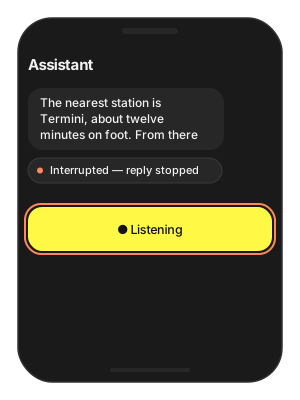
Users want — silence now when they tap or start talking — not after the sentence finishes.
Hard part — three things are generating at once (LLM, TTS, playback) and each has its own way to stop; a stream that was cancelled cannot be reused.
Solution — what to use
speech.cancel()+player.stop()— TTS and playback together.replyTask.cancel()— cancelling the consumingTaskends LLM generation.stream.cancel()on anASRStreamyou own.Open a new stream for the next utterance — streams are single-use.
close()instead ofcancel()when the text simply finished.
let player = AudioStreamPlayer(config: AudioStreamConfig(sample_rate: 24_000))
player.start()
let tts = try await NeuTTSMultilingualPipeline(
    engines_path: "TheStageAI/neutts-nano-multilingual",
    voice_id: "dave",
    language: "english"
)
let speech = tts.open_stream()
let stt = try await WhisperPipeline(
    engines_path: "TheStageAI/thewhisper-large-v3-turbo"
)
let silero = try SileroVAD(engines_path: "TheStageAI/silero-vad")
let engine = ASREngine(pipeline: stt, vad: silero)
let stream = try await engine.open_stream(
    ASRGenerationConfig(language: "en", timestamps: .WORD)
)

// TTS
speech.cancel()
player.stop()

// LLM: stop consuming — cancelling the Task that runs
// llm.infer_stream (see the first guide) ends generation
replyTask.cancel()

// ASR push stream
stream.cancel()
final player = TSAudioPlayer(sampleRate: 24000);
await player.start();
await TheStageFlutterSDK.start_model(
  model_name: 'tts',
  engines_path: 'TheStageAI/neutts-nano-multilingual',
  config: {'voice_id': 'dave', 'language': 'english'},
);
final speech = await TTSStream.open(model_name: 'tts');

// TTS
await speech.cancel();
await player.stop();

// LLM: cancel the StreamSubscription returned by
// infer_stream(...).listen (see the first guide)
await replySub.cancel();

// ASR push stream (ASRStream.open, see the ASR page)
final stream = await ASRStream.open(
  model_name: 'stt',
  vad_model_name: 'vad',
);
await stream.cancel();
Attention
cancel()discards pending audio;close()lets it drain. Useclose()when the text is simply finished.After a cancel, open a new stream for the next utterance — streams are single-use.
Troubleshooting
Symptom |
Cause |
Fix |
|---|---|---|
No audio during streaming |
Consumer attached after the first |
Start the read loop first. |
Audio starts, then silence |
|
|
Choppy audio between sentences |
Chunk seams; or the player was created per chunk. |
|
Long pause before first audio |
Batch call, or a large first chunk, or a cold pipeline. |
Stream; |
Stream never ends |
Producer never called |
Always |
Wrong speed |
Player rate ≠ chunk |
Read the rate off the chunk. |