TTS (Text-to-Speech)
On-device neural speech. Two model families — NeuTTS and Qwen3-TTS — behind one API, producing 24 kHz mono float PCM you can play, save, or stream. Voices swap at runtime without reloading the model, and your own speaker can ship as a small voice pack.
Use it two ways: synthesise a string and get audio back, or open a stream and hear the first words while the rest is still being made.
Main features
Two families, one API:
NeuTTSMultilingualPipelineandQwen3TTSPipelineshareinfer/open_stream/set_voice.Streaming: push text in — whole sentences or LLM tokens — and drain audio as it is synthesised. First audio in tens of milliseconds.
Voice hot-swap:
set_voice(voice_id:)changes speaker or language on a live pipeline, no engine reload.Your own voice: encode a 3-second reference clip into a voice pack and ship it with the app.
Nine languages, one speaker (NeuTTS): english, french, german, spanish, portuguese, japanese, korean, chinese, urdu.
Any output rate: 24 kHz native, resampled once to 16 / 48 kHz if your audio session needs it.
A player is included:
AudioStreamPlayer/TSAudioPlayeraccept exactly this PCM.
In this page
Here we will cover the following topics:
Supported models: the two families, their voices and languages, and how to pick.
Quick start: speak a string, or stream it — Swift and Flutter side by side.
Synthesise speech: the batch call, output format, and the sampling knobs.
Stream speech: push text, drain audio, and the chunking knobs.
Voices and languages: bundle voices, language override, your own voice pack.
Result object:
TTSResultand stream chunk fields.Usage Guides: read notifications aloud, speak an LLM reply, a multilingual tutor, a brand voice, wrong playback speed, slow first audio.
Troubleshooting: symptom → cause → fix.
Load Progress / Prefetch / Cleanup: first-run download, warming the cache, releasing models.
Supported models
Two families. Both produce 24 kHz mono float and accept the same calls; they differ in size, languages and voice character.
Model |
HF repo |
Family |
Device |
Fleet pin |
|---|---|---|---|---|
NeuTTS nano multilingual |
|
NeuTTS |
NPU |
v1.1 |
Qwen3-TTS 12 Hz 0.6B |
|
Qwen3 |
NPU |
v1.1 |
Feature |
NeuTTS nano |
Qwen3-TTS |
|---|---|---|
Bundle voices |
|
|
Languages |
english, french, german, spanish, portuguese, japanese, korean, chinese, urdu — one speaker across all |
follows the voice pack |
Own voice from a clip |
yes (3–10 s reference) |
yes (2–4 s reference) |
Streaming |
yes |
yes |
Voice Agent TTS |
yes |
yes |
Which one?
You need… |
Pick |
Why |
|---|---|---|
Lowest latency and footprint |
NeuTTS nano |
Smallest model; fastest first audio. |
The same speaker in several languages |
NeuTTS nano |
|
Most natural prosody for long narration |
Qwen3-TTS |
Larger talker model; better on long sentences. |
A voice cloned from a very short clip |
Qwen3-TTS |
Clones from ~3 s of reference audio. |
Quick start
Two ways to get audio. Batch when you already have the whole string and a second of latency is fine; stream when the user is waiting to hear it.
You want |
Latency |
Use |
|---|---|---|
Audio for a string you already have |
the whole clip at once |
|
Audio that starts before the text is finished |
first chunk in milliseconds |
|
Speak a string
import TheStageSDK

try await TheStageAI.shared.initialize(api_token: "your-api-token")

let tts = try await NeuTTSMultilingualPipeline(
    engines_path: "TheStageAI/neutts-nano-multilingual",
    voice_id: "dave",
    language: "english"
)

let result = tts.infer(text: "Hello from TheStage.")
// result.samples: [Float] mono in [-1, 1], result.sample_rate == 24000

let player = AudioStreamPlayer(
    config: AudioStreamConfig(sample_rate: Double(result.sample_rate))
)
player.start()
player.enqueue(result.samples)
await player.drain()
player.stop()
import 'package:thestage_apple_sdk/thestage_apple_sdk.dart';

await TheStageFlutterSDK.initialize(api_token: 'your-api-token');
await TheStageFlutterSDK.start_model(
  model_name: 'tts',
  engines_path: 'TheStageAI/neutts-nano-multilingual',
  config: {'voice_id': 'dave', 'language': 'english'},
);

final rows = await TheStageFlutterSDK.infer(
  model_name: 'tts',
  input_json: {'text': 'Hello from TheStage.'},
);
final audio = rows[0]['audio'] as Float32List;
// 24000
final rate  = rows[0]['sample_rate'] as int;

final player = TSAudioPlayer(sampleRate: rate);
await player.start();
player.enqueue(audio);
await player.drain();
await player.stop();
Stream it
let tts = try await NeuTTSMultilingualPipeline(
    engines_path: "TheStageAI/neutts-nano-multilingual",
    voice_id: "dave",
    language: "english"
)

let player = AudioStreamPlayer(config: AudioStreamConfig(sample_rate: 24_000))
player.start()

let speech = tts.open_stream()
// drain BEFORE you send
let consumer = Task {
    for await chunk in speech.output {
        if let pcm = chunk.audio { player.enqueue(pcm) }
    }
}

speech.send("Hello from TheStage. ")
speech.send("This plays while the rest is still being made.")
// no more text
speech.close()
await consumer.value
await player.drain()
player.stop()
await TheStageFlutterSDK.start_model(
  model_name: 'tts',
  engines_path: 'TheStageAI/neutts-nano-multilingual',
  config: {'voice_id': 'dave', 'language': 'english'},
);

final player = TSAudioPlayer(sampleRate: 24000);
await player.start();

final speech = await TTSStream.open(model_name: 'tts');
// listen BEFORE you send
final consumer = speech.output.listen((chunk) {
  final audio = chunk['audio'] as Float32List?;
  if (audio != null) player.enqueue(audio);
});

await speech.send('Hello from TheStage. ');
await speech.send('This plays while the rest is still being made.');
// no more text
await speech.close();
await consumer.asFuture();
await player.drain();
await player.stop();
Important API
Purpose |
Swift |
Flutter |
|---|---|---|
Load a model |
|
|
Speak a string |
|
|
Stream |
|
|
Change voice |
|
|
Play audio |
|
|
Release |
drop the pipeline |
|
Synthesise speech
One string in, one clip out. Use it for notifications, short prompts, and anything you will play more than once — the result is plain PCM you can cache or write to a file.
let tts = try await NeuTTSMultilingualPipeline(
    engines_path: "TheStageAI/neutts-nano-multilingual",
    voice_id: "dave",
    language: "english"
)

var config = TTSGenerationConfig()
// match your audio session (optional)
config.sample_rate_out = 48_000
// calmer; omit for the pack default
config.temperature = 0.8

let result = tts.infer(text: "Your order has shipped.", config: config)

// Play, or keep it
try AudioIO.write_wav(
    samples: result.samples,
    sample_rate: result.sample_rate,
    path: cacheURL.appendingPathComponent("shipped.wav").path
)
print(result.duration, "s of audio in", result.rtf, "× real time")
await TheStageFlutterSDK.start_model(
  model_name: 'tts',
  engines_path: 'TheStageAI/neutts-nano-multilingual',
  config: {'voice_id': 'dave', 'language': 'english'},
);

final rows = await TheStageFlutterSDK.infer(
  model_name: 'tts',
  input_json: {
    'text': 'Your order has shipped.',
    // match your audio session (optional)
    'sample_rate_out': 48000,
    // calmer; omit for the pack default
    'temperature': 0.8,
  },
);
final audio = rows[0]['audio'] as Float32List;
// 48000
final rate  = rows[0]['sample_rate'] as int;
// Play with TSAudioPlayer(sampleRate: rate), or persist the samples.
Output contract — mono float PCM in [-1, 1]. The codec is native
24 kHz; sample_rate_out resamples once on the way out. Whatever
result.sample_rate says is the rate your player must run at.
Sampling options — TTSGenerationConfig. Omit everything for the
pack’s tuned voice; reach for these with a specific goal.
Field |
Default |
Change it when |
|---|---|---|
|
pack (≈ 0.9) |
Lower to |
|
pack (≈ 50) |
Lower to |
|
24 000 |
Your |
|
random |
Golden-file tests. Same seed + same device + same pack → same PCM. |
|
false |
Diagnosing an empty result. |
Stream speech
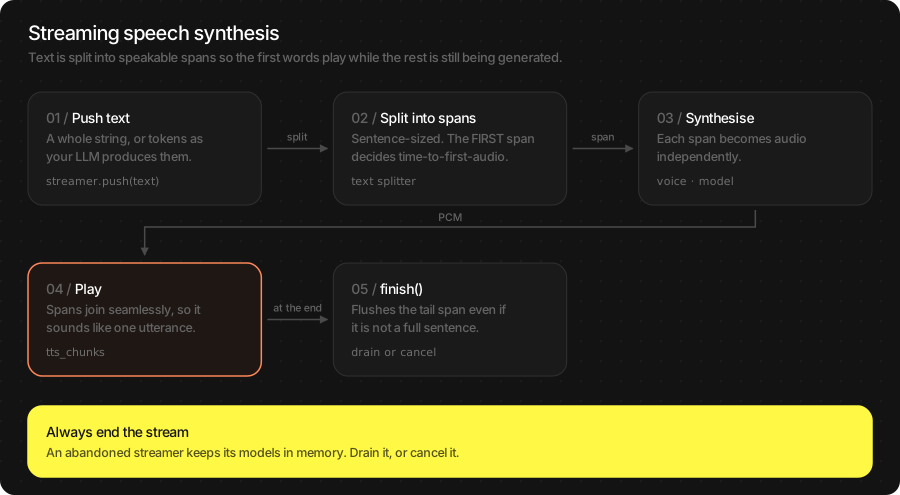
A stream takes text in any size — whole paragraphs or one LLM token at a time — splits it into sentences internally, and emits audio chunks as each span is synthesised. The user hears the first words while the model is still working on the rest.
let llm = try await TSLLM(engines_path: "TheStageAI/Qwen3-0.6B")
let tts = try await NeuTTSMultilingualPipeline(
    engines_path: "TheStageAI/neutts-nano-multilingual",
    voice_id: "dave",
    language: "english"
)
let player = AudioStreamPlayer(config: AudioStreamConfig(sample_rate: 24_000))
player.start()
var llmConfig = llm.generation_defaults
llmConfig.enable_thinking = false

let speech = tts.open_stream(
    TTSGenerationConfig(),
    // faster first audio
    config: TTSStreamConfig(first_frames_per_chunk: 12)
)
let consumer = Task {
    for await chunk in speech.output {
        if let pcm = chunk.audio { player.enqueue(pcm) }
        if chunk.is_final { break }
    }
}

for await token in llm.infer_stream(prompt: question, config: llmConfig) {
    // tokens, not sentences
    if !token.is_final { speech.send(token.text) }
}
speech.close()
await consumer.value
await TheStageFlutterSDK.start_model(
  model_name: 'llm',
  engines_path: 'TheStageAI/Qwen3-0.6B',
);
await TheStageFlutterSDK.start_model(
  model_name: 'tts',
  engines_path: 'TheStageAI/neutts-nano-multilingual',
  config: {'voice_id': 'dave', 'language': 'english'},
);
final player = TSAudioPlayer(sampleRate: 24000);
await player.start();

final speech = await TTSStream.open(
  model_name: 'tts',
  stream_config: const TTSStreamConfig(first_frames_per_chunk: 12),
);
final consumer = speech.output.listen((chunk) {
  final audio = chunk['audio'] as Float32List?;
  if (audio != null) player.enqueue(audio);
});

await for (final token in TheStageFlutterSDK.infer_stream(
  model_name: 'llm', input_json: {'prompt': question})) {
  if (token['is_final'] == true) break;
  // tokens, not sentences
  await speech.send(token['delta'] as String? ?? '');
}
await speech.close();
await consumer.asFuture();
Attention
Start draining output before the first send. If you send
all the text first and read afterwards, the buffer fills and nothing
plays.
Stream calls — TTSStream (Swift and Flutter):
Call |
Use it to |
|---|---|
|
Push text. Any size; sentence splitting is internal. |
|
Speak what is buffered now, even a fragment without a full stop. |
|
No more text. |
|
Stop immediately — the user interrupted. |
Chunking options — TTSStreamConfig. The defaults suit a
voice assistant; touch these only for latency or seam quality.
Field |
Default |
Change it when |
|---|---|---|
|
25 |
Lower to |
|
25 |
Raise if individual chunks sound thin. |
|
1 |
Raise to |
|
5 / 50 |
Leave alone. |
Voices and languages
Three knobs compose, and they have the same names on the constructor and
on set_voice: ``voice_id`` picks a speaker that ships in the
pack; ``voice_dir`` points at an external voice pack (yours, or a
downloaded one) and wins over voice_id; ``language`` switches
phonemisation on NeuTTS while keeping the speaker.
// At load
let tts = try await NeuTTSMultilingualPipeline(
    engines_path: "TheStageAI/neutts-nano-multilingual",
    voice_id: "paul",
    language: "english"
)
// ["dave", "jo", "paul"]
print(tts.available_voices)

// At runtime — no engine reload
try tts.set_voice(voice_id: "dave")
try tts.set_voice(voice_id: "dave", language: "french")
// your own voice pack
try tts.set_voice(voice_dir: packURL.path)
// back to the bundle voice
try tts.set_voice(voice_dir: "")
// Voice is fixed at load. To change it, stop and start again.
await TheStageFlutterSDK.stop_model(model_name: 'tts');
await TheStageFlutterSDK.start_model(
  model_name: 'tts',
  engines_path: 'TheStageAI/neutts-nano-multilingual',
  config: {
    'voice_id': 'dave',
    'language': 'french',
    // 'voice_dir': '/path/to/your/voice_pack',   // wins over voice_id
  },
);
Your own voice. A voice pack is a folder with one voice.json,
produced from a short reference clip and its transcript with the public
tools in the AppleSDK repo — see
Ship a brand voice below.
Note
Inside the Voice Agent the same knobs are tts_voice,
tts_voice_dir and tts_language on TSAgentConfig, and
agent.set_voice(...) on Flutter — see Voice Agent.
Result object
TTSResult is what infer returns; stream chunks carry the audio
fields only.
let tts = try await NeuTTSMultilingualPipeline(
    engines_path: "TheStageAI/neutts-nano-multilingual",
    voice_id: "dave",
    language: "english"
)
let speech = tts.open_stream()
var config = TTSGenerationConfig()

let result = tts.infer(text: text, config: config)
// [Float], mono, [-1, 1]
result.samples
// 24000, or sample_rate_out
result.sample_rate
// seconds of audio
result.duration
// audio seconds per wall second
result.rtf

for await chunk in speech.output {
    // [Float]? — nil on the final marker
    chunk.audio
    // Int?
    chunk.sample_rate
    chunk.is_final
}
await TheStageFlutterSDK.start_model(
  model_name: 'tts',
  engines_path: 'TheStageAI/neutts-nano-multilingual',
  config: {'voice_id': 'dave', 'language': 'english'},
);
final speech = await TTSStream.open(model_name: 'tts');

final r = rows[0];
// Float32List
r['audio'];
// 24000, or sample_rate_out
r['sample_rate'];
r['duration'];
r['rtf'];

speech.output.listen((chunk) {
  // Float32List? — null on the final marker
  chunk['audio'];
  chunk['sample_rate'];
  chunk['is_final'];
});
Swift |
Flutter JSON |
Meaning |
|---|---|---|
|
|
The PCM. |
|
|
Hz. Run the player at exactly this. |
|
|
Seconds of audio produced. |
|
|
Audio seconds per wall second. |
|
same |
Where the time went. |
Usage Guides
Each guide is one production question: what you are building, what to use, the code, and what not to forget.
Read notifications aloud
Problem
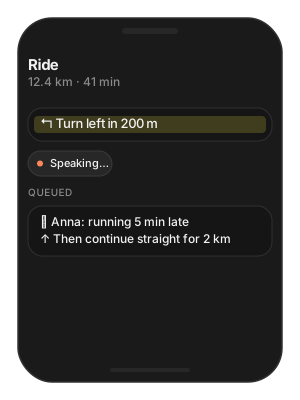
Building — a cycling app that reads turn-by-turn directions and incoming messages while the phone is in a pocket.
Users want — each phrase spoken clearly, in order, never cut off by the next one, and at the volume and rate the rest of the app already uses.
Hard part — phrases arrive faster than they can be spoken, the audio session runs at 48 kHz, and re-creating a player per phrase adds a click and a delay.
Solution — what to use
NeuTTSMultilingualPipeline— loaded once and kept.tts.infer(text:config:)— one batch call per phrase; short phrases synthesise well under a second.TTSGenerationConfig.sample_rate_out = 48_000— match the session so nothing is resampled twice.One
AudioStreamPlayerfor the app’s lifetime;enqueuethendrain()so phrases never overlap.Flutter:
TSAudioPlayer(sampleRate:)with the same enqueue / drain pattern.
final class Announcer {
    private let tts: NeuTTSMultilingualPipeline
    private let player = AudioStreamPlayer(
        config: AudioStreamConfig(sample_rate: 48_000))
    private var config = TTSGenerationConfig()

    init(tts: NeuTTSMultilingualPipeline) {
        self.tts = tts
        // the session rate
        config.sample_rate_out = 48_000
        player.start()
    }

    func say(_ phrase: String) async {
        let clip = tts.infer(text: phrase, config: config)
        // queued after whatever is playing
        player.enqueue(clip.samples)
        // wait so phrases never overlap
        await player.drain()
    }
}
await TheStageFlutterSDK.start_model(
  model_name: 'tts',
  engines_path: 'TheStageAI/neutts-nano-multilingual',
  config: {'voice_id': 'dave', 'language': 'english'},
);

class Announcer {
  final player = TSAudioPlayer(sampleRate: 48000);
  Future<void> init() => player.start();

  Future<void> say(String phrase) async {
    final rows = await TheStageFlutterSDK.infer(
      model_name: 'tts',
      input_json: {'text': phrase, 'sample_rate_out': 48000},
    );
    player.enqueue(rows[0]['audio'] as Float32List);
    // phrases never overlap
    await player.drain();
  }
}
Attention
One player for the app’s lifetime. Creating one per phrase adds a start-up click and latency.
Cache clips for phrases you repeat (“Turn left”) —
samplesis a plain array; write it once withAudioIO.write_wav.Keep the pipeline loaded between phrases; loading is the slow part, synthesis of a short phrase is well under a second.
Speak an LLM reply as it is generated
Problem
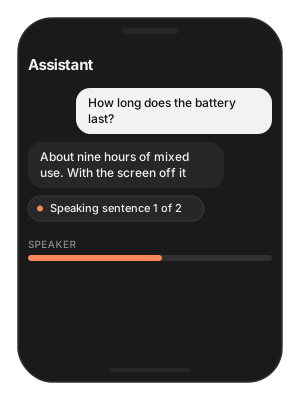
Building — a voice assistant whose answers come from an on-device LLM.
Users want — to hear the first sentence while the rest is still being written — not a two-second pause and then the whole answer.
Hard part — tokens arrive one at a time, sentences must be found before they can be spoken, and tool or reasoning output must never be read aloud.
Solution — what to use
tts.open_stream()— aTTSStreamthat finds sentence boundaries itself; you feed it tokens.LLMChatEngine.chat_session+infer_stream— send only.text_deltainto the stream.Start the consumer of
speech.outputbefore the firstsend.speech.close()when the reply ends;speech.cancel()plusplayer.stop()on barge-in.enable_thinking = falseon the LLM.
let tts = try await NeuTTSMultilingualPipeline(
    engines_path: "TheStageAI/neutts-nano-multilingual",
    voice_id: "dave",
    language: "english"
)
let player = AudioStreamPlayer(config: AudioStreamConfig(sample_rate: 24_000))
player.start()
let llm = try await TSLLM(engines_path: "TheStageAI/Qwen3-0.6B")
let session = LLMChatEngine(
    llm: llm).chat_session(system_prompt: "You are a helpful assistant.",
    memory: .SLIDING(max_turns: 10)
)
var llmConfig = llm.generation_defaults
llmConfig.enable_thinking = false
// the user's question (typed, or an ASR transcript)
let question = "How long does the battery last?"

let speech = tts.open_stream()
let consumer = Task {
    for await chunk in speech.output {
        if let pcm = chunk.audio { player.enqueue(pcm) }
    }
}

for await event in try session.infer_stream(
    user_request: question, config: llmConfig
) {
    // only text_delta
    if case .text_delta(let t) = event { speech.send(t) }
}
speech.close()
await consumer.value
await TheStageFlutterSDK.start_model(
  model_name: 'llm',
  engines_path: 'TheStageAI/Qwen3-0.6B',
);
await TheStageFlutterSDK.start_model(
  model_name: 'tts',
  engines_path: 'TheStageAI/neutts-nano-multilingual',
  config: {'voice_id': 'dave', 'language': 'english'},
);
final player = TSAudioPlayer(sampleRate: 24000);
await player.start();

// the user's question (typed, or an ASR transcript)
const question = 'How long does the battery last?';

final speech = await TTSStream.open(model_name: 'tts');
final consumer = speech.output.listen((chunk) {
  final audio = chunk['audio'] as Float32List?;
  if (audio != null) player.enqueue(audio);
});

await for (final chunk in TheStageFlutterSDK.infer_stream(
  model_name: 'llm', input_json: {'prompt': question, 'enable_thinking': false})) {
  if (chunk['is_final'] == true) break;
  if (chunk['kind'] == 'text' || chunk['kind'] == 'text_delta') {
    await speech.send(chunk['delta'] as String? ?? '');
  }
}
await speech.close();
await consumer.asFuture();
Attention
Send only
text_delta. Never sendtool_resultorthinking_delta— you would hear JSON.Set
enable_thinking = falseon the LLM or the speaker waits through the reasoning.Barge-in:
speech.cancel()andplayer.stop()together, then open a fresh stream. The full loop with echo cancellation is the Voice Agent.
One tutor voice, several languages
Problem
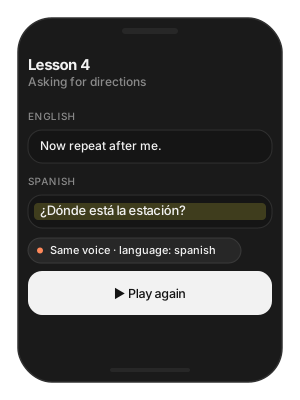
Building — a language-learning app that explains in English and then says the phrase in Spanish.
Users want — the same teacher’s voice in both languages, and no pause when it switches.
Hard part — most engines change speaker when they change language; reloading a pipeline per language costs seconds.
Solution — what to use
NeuTTSMultilingualPipeline— keeps the speaker across languages.tts.set_voice(voice_id:language:)between sentences — no reload.Language names are lowercase words:
"spanish", not"es".Flutter fixes the voice at load: run two handles (
tts_en,tts_es) that share one cached engine.
let tts = try await NeuTTSMultilingualPipeline(
    engines_path: "TheStageAI/neutts-nano-multilingual",
    voice_id: "dave",
    language: "english"
)
let player = AudioStreamPlayer(config: AudioStreamConfig(sample_rate: 24_000))
player.start()

try tts.set_voice(voice_id: "paul", language: "english")
player.enqueue(tts.infer(text: "Now repeat after me.").samples)

try tts.set_voice(voice_id: "paul", language: "spanish")
player.enqueue(tts.infer(text: "¿Dónde está la estación?").samples)

await player.drain()
// Flutter fixes the voice at load: run two handles, one per language.
await TheStageFlutterSDK.start_model(
  model_name: 'tts_en',
  engines_path: 'TheStageAI/neutts-nano-multilingual',
  config: {'voice_id': 'paul', 'language': 'english'},
);
await TheStageFlutterSDK.start_model(
  model_name: 'tts_es',
  engines_path: 'TheStageAI/neutts-nano-multilingual',
  config: {'voice_id': 'paul', 'language': 'spanish'},
);
// Both share one cached engine on disk; only the voice differs.
Attention
Language names are lowercase words —
"spanish", not"es".A sentence in the wrong language sounds phonetically wrong, not broken. If Spanish sounds like an English speaker reading it, the
languagedid not switch.The end-to-end pattern with tagged scripts and gapless playback: Apple SDK: dynamic language-switching TTS.
Ship a brand voice with the app
Problem
Building — an app whose every prompt is spoken by the company’s voice actor.
Users want — one recognisable voice everywhere in the product, without a custom model and without a download on first launch.
Hard part — the reference clip has to be encoded once into something the pipeline loads in milliseconds, and it has to survive app updates.
Solution — what to use
prepare_neutts_voice_pack.py(in the AppleSDK repo) — turns a 3–10 s reference clip into a voice pack folder.Bundle the folder;
NeuTTSMultilingualPipeline(engines_path:voice_dir:)—voice_dirwins overvoice_id.tts.available_voices— list bundle voices next to yours in a picker.Flutter: copy the pack out of assets to a real path, then
config:
{'voice_dir': …}
.
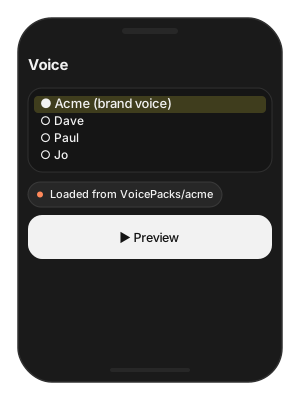
# From github.com/TheStageAI/AppleSDK — PyPI + Hugging Face only
cd examples/tools/prepare_voice_packs
python3 -m venv .venv && source .venv/bin/activate

pip install -r requirements-neutts.txt
python prepare_neutts_voice_pack.py \
  --ref-audio ./brand_voice.wav \
  --ref-text  "Welcome to Acme. How can I help you today?" \
  --language english \
  --name acme \
  --out-dir ./VoicePacks/acme

# Qwen3-TTS: requirements-qwen3.txt + prepare_qwen3_voice_pack.py
let packURL = Bundle.main.url(forResource: "acme", withExtension: nil,
                              subdirectory: "VoicePacks")!
let tts = try await NeuTTSMultilingualPipeline(
    engines_path: "TheStageAI/neutts-nano-multilingual",
    // wins over voice_id
    voice_dir: packURL.path,
)
// Copy the pack out of Flutter assets to a real path first —
// the native side needs a filesystem folder.
final packDir = await copyAssetFolder('VoicePacks/acme');
await TheStageFlutterSDK.start_model(
  model_name: 'tts',
  engines_path: 'TheStageAI/neutts-nano-multilingual',
  config: {'voice_dir': packDir.path},
);
Attention
Reference clip: NeuTTS 3–10 s, Qwen3 2–4 s. Close mic, no music, one speaker, no clipping.
--ref-textmust match the audio exactly.The pack is one
voice.json; it loads in milliseconds and is validated at load — a bad file throws before the firstinfer.Record one clip per language with the same mic setup if the brand voice must speak several languages.
Audio plays too fast, too slow, or clicks
Problem
Building — any app that plays what TTS returns.
Users want — natural speech at the right pitch on every device, no tick between sentences.
Hard part — the speed bug is invisible in code — a player opened at 44.1 kHz happily plays a 24 kHz clip, slow and deep — and seam clicks only show up while streaming.
Solution — what to use
result.sample_rate— open the player at that rate, every time; never a hard-coded number.TTSStreamConfig(overlap_frames: 3)— smooths chunk seams while streaming.Inside the Voice Agent set the speaker rate with the agent’s
sample_rate_out, not on the TTS config.
let tts = try await NeuTTSMultilingualPipeline(
    engines_path: "TheStageAI/neutts-nano-multilingual",
    voice_id: "dave",
    language: "english"
)
var config = TTSGenerationConfig()

// ✅ player follows the result
let result = tts.infer(text: text, config: config)
let player = AudioStreamPlayer(
    config: AudioStreamConfig(sample_rate: Double(result.sample_rate)))

// ❌ hard-coded 44_100 while the clip is 24 kHz → slow and deep
// let player = AudioStreamPlayer(config: AudioStreamConfig(sample_rate: 44_100))

// Clicks at seams while streaming:
let speech = tts.open_stream(config: TTSStreamConfig(overlap_frames: 3))
await TheStageFlutterSDK.start_model(
  model_name: 'tts',
  engines_path: 'TheStageAI/neutts-nano-multilingual',
  config: {'voice_id': 'dave', 'language': 'english'},
);

// ✅ player follows the result
final rate = rows[0]['sample_rate'] as int;
final player = TSAudioPlayer(sampleRate: rate);

// ❌ TSAudioPlayer(sampleRate: 44100) for a 24 kHz clip → slow and deep

// Clicks at seams while streaming:
final speech = await TTSStream.open(
  model_name: 'tts',
  stream_config: const TTSStreamConfig(overlap_frames: 3),
);
Attention
Read
sample_rateoff the result every time; never assume 24 000 oncesample_rate_outis in play.Inside the Voice Agent the speaker rate is the agent’s
sample_rate_out— set it there, not on the TTS config.
First audio takes too long
Problem
Building — an assistant that answers short questions.
Users want — the first syllable almost immediately, even for a one-line reply.
Hard part — the very first synthesis after load is the slowest, and a full first chunk has to be rendered before anything can play.
Solution — what to use
tts.open_stream(config:)instead of batchinfer.TTSStreamConfig(first_frames_per_chunk: 8)— a short first chunk; later chunks stay full size.Warm the pipeline once at launch (
tts.infer(text: "Ready.")) off the main path.prefetch_engineson a splash screen so the first load is local.
let tts = try await NeuTTSMultilingualPipeline(
    engines_path: "TheStageAI/neutts-nano-multilingual",
    voice_id: "dave",
    language: "english"
)

// 1. Stream, don't batch
let speech = tts.open_stream(
    // 2. A short first chunk — later chunks stay full size
    config: TTSStreamConfig(first_frames_per_chunk: 8)
)

// 3. Warm once at launch, off the main path
Task.detached { _ = tts.infer(text: "Ready.") }
await TheStageFlutterSDK.start_model(
  model_name: 'tts',
  engines_path: 'TheStageAI/neutts-nano-multilingual',
  config: {'voice_id': 'dave', 'language': 'english'},
);

// 1 + 2
final speech = await TTSStream.open(
  model_name: 'tts',
  stream_config: const TTSStreamConfig(first_frames_per_chunk: 8),
);

// 3. Warm once at launch
unawaited(TheStageFlutterSDK.infer(
  model_name: 'tts', input_json: {'text': 'Ready.'}));
Attention
first_frames_per_chunkbelow6starts to sound clipped;8–12is the sweet spot.The very first synthesis after load is slower than every later one. Warm it during onboarding, not when the user taps the mic.
Prefetch the pack on a splash screen so first load is local too.
Troubleshooting
Symptom |
Cause |
Fix |
|---|---|---|
Empty |
Empty or whitespace text; unknown |
Check the text; |
Nothing plays while streaming |
Consumer attached after |
Drain |
Too fast / too slow |
Player rate ≠ |
Read the rate off the result. |
Clicks between sentences |
Chunk seams. |
|
Wrong pronunciation |
|
|
Slow first audio |
Batch call, or large first chunk, or cold pipeline. |
Stream; |
Voice sounds like the default, not the pack |
|
Pass an absolute folder path containing |
Flutter: voice did not change |
Voice is fixed at |
|
Load Progress / Prefetch / Cleanup
First run downloads and prepares the pack; later runs hit the cache. Show progress the first time, warm the cache on a splash screen, and release models you are done with.
let ai = TheStageAI.shared

// Progress
let tts = try await NeuTTSMultilingualPipeline(
    engines_path: "TheStageAI/neutts-nano-multilingual",
    voice_id: "dave",
    on_load_progress: { p in
        print("[\(p.model)] \(p.phase) \(Int(p.fraction * 100))%")
    }
)

// Prefetch on a splash screen, construct later
let engines_dir = try await ai.prefetch_engines(
    repo_id: "TheStageAI/neutts-nano-multilingual")
let tts = try await NeuTTSMultilingualPipeline(
    engines_path: engines_dir, voice_id: "dave")

// Cleanup: drop the reference, or
_ = try ai.stop_model(model_name: "tts")
// Progress
TheStageFlutterSDK.on_progress.listen((event) {
  if (event['model_name'] != 'tts') return;
  print('[tts] ${event['phase']} ${((event['progress'] ?? 0) * 100).round()}%');
});

await TheStageFlutterSDK.start_model(
  model_name: 'tts',
  engines_path: 'TheStageAI/neutts-nano-multilingual',
  config: {'voice_id': 'dave', 'language': 'english'},
);

// Cleanup
await TheStageFlutterSDK.stop_model(model_name: 'tts');
Phases: downloading → extracting → loading → ready. Cache
hits skip the first two. Full contract: TheStage Apple SDK
(Load Progress).