ASR (Speech-to-Text)
On-device speech recognition. Two model families ship — TheWhisper
and Qwen3-ASR — and both take the same 16 kHz mono float audio
and return the same ASRResult. Nothing you record leaves the device.
Use it in two ways: hand over a clip and get a transcript back, or open a live session and get captions while the user is still talking.
Main features
One call for both families:
infer(audio:config:)on Swift,infer(model_name: "stt", …)on Flutter. Switch model by changing the engine path.Live captions: two kinds of text at once — committed words that will not change, and a hypothesis that fills in ahead of them.
The SDK can own the microphone:
ASREngine(config:)captures, detects speech and decides when a sentence ended. You only read text.Or you keep your audio pipeline: push 16 kHz frames into
open_streamfrom any source.Long recordings: pass the whole file; windowing and stitching are automatic.
Word timestamps:
timestamps: .WORDreturns every word with start and end, for seeking and highlighting.Language detection:
language: "auto"when you do not know what the user will speak.
In this page
Here we will cover the following topics:
Supported models: the two families, what each does better, and how to pick.
Quick start: transcribe a file, live captions, or push your own PCM — Swift and Flutter side by side.
Transcribe audio: the batch call, the audio contract, and per-call options.
Live captions: the two
ASREnginemodes, committed vs hypothesis text, and which knobs are worth touching.Result object:
ASRResultfields and their Flutter JSON keys.Usage Guides: voice notes, meeting recordings, telephony audio, live subtitles, multilingual users, turn endings.
Troubleshooting: symptom → cause → fix.
Load Progress / Prefetch / Cleanup: first-run download, warming the cache, releasing models.
Supported models
Two families, chosen by what your product needs rather than by API — the calls are identical.
Model |
HF repo |
Base |
Device |
Fleet pin |
|---|---|---|---|---|
TheWhisper Large V3 Turbo |
|
Whisper-large-v3-turbo |
NPU |
v1.1 |
Qwen3-ASR 0.6B |
|
0.6B |
NPU |
v1.1 |
Feature |
TheWhisper turbo |
Qwen3-ASR 0.6B |
|---|---|---|
Batch |
yes |
yes |
Live captions ( |
yes, sentence-level commits |
yes, prefix commits |
Word timestamps |
yes, measured |
approximate |
Language hint |
|
|
Long audio |
10 s windows, stitched |
30 s windows, stitched |
Voice Agent STT |
yes |
yes |
Which one?
You need… |
Pick |
Why |
|---|---|---|
Live captions that read well while the user talks |
TheWhisper |
Measured word timing lets it commit whole sentences with punctuation, so text does not flicker. |
Word-level timestamps for seeking or highlighting |
TheWhisper |
Timings are measured, not estimated. |
Transcripts fed straight into an LLM prompt |
Qwen3-ASR |
Same tokenizer family as Qwen3 LLMs; output is plain text. |
Smallest footprint |
TheWhisper |
Smaller decoder, faster first result on Apple Silicon. |
Voice Agent |
Either |
The agent routes automatically from the pack. |
Quick start
Three ways to run ASR. They differ in one thing — who owns the microphone — and that decides the whole shape of your code.
You want |
Who owns audio |
Use |
|---|---|---|
A transcript of a file |
Nobody — you hand over samples |
|
Live captions, fastest path |
The SDK: mic, VAD and turns |
|
Live captions inside an audio app you already have |
You — push PCM frames |
|
Transcribe a file
import TheStageSDK

try await TheStageAI.shared.initialize(api_token: "your-api-token")

let stt = try await WhisperPipeline(
    engines_path: "TheStageAI/thewhisper-large-v3-turbo"
)

let samples = try AudioIO.load_wav(
    path: "/path/to/clip.wav",
    target_sample_rate: 16_000
)

let result = try stt.infer(
    audio: samples,
    config: ASRGenerationConfig(language: "en")
)
print(result.text)
import 'package:thestage_apple_sdk/thestage_apple_sdk.dart';

await TheStageFlutterSDK.initialize(api_token: 'your-api-token');
await TheStageFlutterSDK.start_model(
  model_name: 'stt',
  engines_path: 'TheStageAI/thewhisper-large-v3-turbo',
);

// 16 kHz mono Float32 samples — here a headerless float32 file
// (see Audio contract)
final bytes = await File('/path/to/clip_16k.pcm').readAsBytes();
final pcm16k = Float32List.view(bytes.buffer);
final stt = ASREngine(stt: 'stt');
final result = await stt.infer(
  // Float32List, 16 kHz mono
  pcm16k,
  config: const ASRGenerationConfig(language: 'en'),
);
print(result.text);
Live captions — the SDK owns the microphone
The shortest path to working captions. You get text; the SDK handles capture, voice detection, and deciding where one utterance ends.
var config = TSAgentConfig(
    vad: "TheStageAI/silero-vad",
    stt: "TheStageAI/thewhisper-large-v3-turbo"
)
config.asr_generation = ASRGenerationConfig(
    language: "en",
    timestamps: .WORD
)

let engine = ASREngine(config: config)
let captions = Task {
    for await turn in engine.turns.recv() {
        committedLabel.text = turn.committed
        hypothesisLabel.text =
            turn.end_of_turn ? "" : turn.hypothesis
    }
}

// the SDK now owns the microphone
try await engine.start()
// ... later
await engine.stop()
await captions.value
final asr = TSASREngine();

asr.turns.listen((turn) {
  committed.value  = turn.committed;
  hypothesis.value = turn.end_of_turn ? '' : turn.hypothesis;
});

await asr.start(config: {
  'vad': 'TheStageAI/silero-vad',
  'stt': 'TheStageAI/thewhisper-large-v3-turbo',
  'language': 'en',
});
// ... later
await asr.stop();
Attention
Subscribe before start(). A listener attached afterwards misses
everything already emitted — the usual report is “captions are empty”.
Live captions — you own the audio
Use this when your app already has an audio pipeline and you want to push frames into ASR yourself.
let silero = try SileroVAD(engines_path: "TheStageAI/silero-vad")
let engine = ASREngine(pipeline: stt, vad: silero)
let stream = try await engine.open_stream(
    ASRGenerationConfig(language: "en", timestamps: .WORD)
)

// Your audio source. MicAudioSource is the SDK's microphone capture:
// 16 kHz mono [Float], one 512-sample frame every 32 ms. Any 16 kHz source works.
let mic = MicAudioSource(sample_rate: 16_000)

let captions = Task {
    for await turn in stream.turns {
        committedLabel.text  = turn.committed
        hypothesisLabel.text = turn.end_of_turn ? "" : turn.hypothesis
    }
}
let pump = Task {
    // ends when mic.stop() is called
    for await frame in mic.stream {
        stream.send(frame)
    }
}

try mic.start()
// ... the user taps "stop"
mic.stop()
await pump.value
// the transcript to store
let result = await stream.close()
await captions.value
print(result.text)
await TheStageFlutterSDK.start_model(
  model_name: 'vad', engines_path: 'TheStageAI/silero-vad');
await TheStageFlutterSDK.start_model(
  model_name: 'stt', engines_path: 'TheStageAI/thewhisper-large-v3-turbo');

final stream = await ASRStream.open(
  model_name: 'stt',
  vad_model_name: 'vad',
  generation: const ASRGenerationConfig(language: 'en'),
);
final captions = stream.events.listen((e) {
  if (!e.is_turn) return;
  committed.value  = e.payload['committed'] as String;
  hypothesis.value = e.payload['end_of_turn'] == true
      ? '' : e.payload['hypothesis'] as String;
});

// Your audio source: 16 kHz mono Float32 samples. The plugin does not capture
// the microphone for push streams — for a live mic use TSASREngine above.
// Here the audio is a headerless 16 kHz float32 file, sent in 100 ms frames.
final bytes = await File('/path/to/clip_16k.pcm').readAsBytes();
final pcm = Float32List.view(bytes.buffer);
for (var i = 0; i < pcm.length; i += 1600) {
  await stream.send(pcm.sublist(i, min(i + 1600, pcm.length)));
}
final result = await stream.close();
await captions.cancel();
print(result.text);
Important API
Purpose |
Swift |
Flutter |
|---|---|---|
Load a model |
|
|
Transcribe a clip |
|
|
Live, SDK owns mic |
|
|
Live, you push audio |
|
|
Release |
drop the pipeline |
|
Transcribe audio
One call, one transcript. Give it 16 kHz mono float samples of any length — a two-second command or a forty-minute meeting — and it returns the text, and if asked, every word with its start and end time.
let stt = try await WhisperPipeline(
    engines_path: "TheStageAI/thewhisper-large-v3-turbo"
)

let samples = try AudioIO.load_wav(
    path: "/path/to/meeting.wav",
    // resampled for you
    target_sample_rate: 16_000
)

let result = try stt.infer(
    audio: samples,
    config: ASRGenerationConfig(
        language: "en",
        timestamps: .WORD,
        // for long audio, see below
        overlap: 0.2
    )
)

print(result.text)
for word in result.words ?? [] {
    print("\(word.t0)s–\(word.t1)s  \(word.text)")
}
await TheStageFlutterSDK.start_model(
  model_name: 'stt',
  engines_path: 'TheStageAI/thewhisper-large-v3-turbo',
);

// 16 kHz mono Float32 samples — here a headerless float32 file
// (see Audio contract)
final bytes = await File('/path/to/clip_16k.pcm').readAsBytes();
final pcm16k = Float32List.view(bytes.buffer);
final stt = ASREngine(stt: 'stt');
final result = await stt.infer(
  // Float32List
  pcm16k,
  config: const ASRGenerationConfig(
    language: 'en',
    timestamps: ASRTimestampMode.WORD,
    // for long audio, see below
    overlap: 0.2,
  ),
);

print(result.text);
for (final w in result.words ?? const <ASRWord>[]) {
  print('${w.t0}s–${w.t1}s  ${w.text}');
}
Audio contract — infer does not convert audio. It must already be:
Sample rate |
16 000 Hz. Anything else decodes as time-warped speech and
returns nonsense or nothing. |
Channels |
Mono. |
Format |
Float in |
Loudness |
Do not peak-normalise. The models expect natural levels. |
Per-call options — ASRGenerationConfig:
Field |
Default |
Meaning |
|---|---|---|
|
|
ISO code, or |
|
|
|
|
|
Long audio is cut into windows (10 s TheWhisper, 30 s Qwen3-ASR).
|
|
derived |
Cap on decode per window. Leave unset — the default follows the real audio length. |
|
|
Include token IDs in the result. Debugging only. |
Live captions
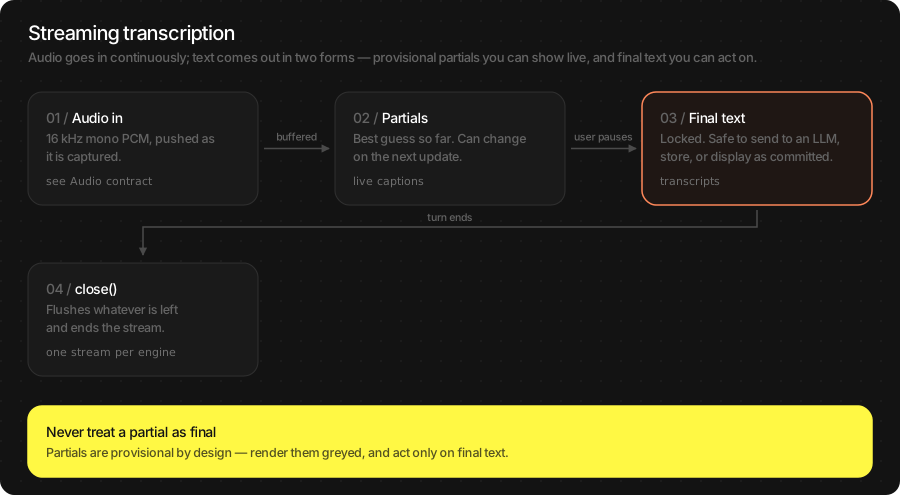
Live recognition gives you text while the user is still speaking. It comes as two kinds of text at once, and a caption UI needs both:
committed — locked in. It will not be rewritten. Append it.
hypothesis — the model’s current best guess at what is still being said. It will be rewritten. Render it in a separate, lighter label.
ASREngine is one class with two modes, chosen by which
initializer you call:
|
|
|
|---|---|---|
Who captures audio |
The SDK |
You |
How audio gets in |
Automatically, from the mic |
|
Start / stop |
|
|
Voice detection & turns |
Built in |
Pass a |
Flutter |
|
|
Read results from |
|
|
Rendering a caption
The one pattern to get right. ASRTurn carries committed,
hypothesis, display (the two joined) and end_of_turn.
var config = TSAgentConfig(
    vad: "TheStageAI/silero-vad",
    stt: "TheStageAI/thewhisper-large-v3-turbo"
)
let engine = ASREngine(config: config)

for await turn in engine.turns.recv() {
    // ✅ two labels: solid text, then a dimmed guess
    committedLabel.text  = turn.committed
    hypothesisLabel.text = turn.end_of_turn ? "" : turn.hypothesis

    // ✅ one label, if you must
    captionLabel.text = turn.display

    // ❌ appending display doubles words when the guess firms up
    // transcript += turn.display
}
// started with asr.start(config:) as in Quick start
final asr = TSASREngine();

asr.turns.listen((turn) {
  // ✅ two widgets: solid text, then a dimmed guess
  committed.value  = turn.committed;
  hypothesis.value = turn.end_of_turn ? '' : turn.hypothesis;

  // ✅ one widget, if you must
  caption.value = turn.display;

  // ❌ appending display doubles words when the guess firms up
  // transcript += turn.display;
});
Important API
Channels on ASREngine(config:) and TSASREngine:
Channel |
What arrives |
|---|---|
|
Every |
|
One final string per completed utterance. |
|
Live text for a caption label. Latest value wins; intermediate values may be skipped if your UI is slow. |
|
Per-frame speech probability, for a mic meter. |
|
Lifecycle and error events. |
Calls on ASRStream (Swift and Flutter):
Call |
Use it to |
|---|---|
|
Push 16 kHz mono frames. Any frame size. |
|
Force a commit at a pause you detected yourself. |
|
End the session and get the authoritative |
|
Abandon the session — barge-in, or the user left the screen. |
Attention
close() returns the transcript you should store. The live text you
rendered from partials is cosmetic and may differ — it was produced
before the model had heard the end of the sentence.
Warning
The two modes do not mix. engine.config and engine.state exist
only for ASREngine(config:); reading them on a pipeline:-built
engine traps at runtime rather than returning nil.
Per-engine configuration — TSAgentConfig for ASREngine(config:).
Changing any of it means stop() then start().
Field |
Controls |
|---|---|
|
Language and timestamp mode — the same |
|
When an utterance is over: |
|
How sensitive capture is: |
|
Commit policy — see below. |
|
Microphone settings, or a complete replacement audio source. |
Note
Turn policy and capture sensitivity are separate on purpose. “It cuts me
off mid-sentence” is turn_config.silence_timeout_ms. “It starts on a
door click” is vad_config.threshold. Reaching for the wrong one is
the most common tuning mistake here.
On Flutter, TSASREngine.start(config:) accepts vad, stt,
vad_device, stt_device, stt_revision, language,
turn_silence_timeout_ms and turn_asr_silence_hangover_ms. The
rest is deliberately not exposed — the per-model policy is already tuned.
Commit policy — ASRStreamingConfig. Streaming has to decide when
a word is safe to show as final. Leaving this empty picks the right
policy for the loaded model; most apps never set it.
Algorithm |
Runs on |
Behaviour |
|---|---|---|
|
Models with word timing (TheWhisper — its default) |
Commits a sentence at a time, so punctuation and casing are right and text stops flickering. |
|
Any streaming model (Qwen3-ASR default) |
Commits the longest prefix that repeated decodes agree on. Simple and portable; more rewriting on screen. |
Field |
Default |
Raise it / lower it when |
|---|---|---|
|
2 |
Raise for fewer rewrites on screen, at the cost of text appearing later. |
|
1.0 s TheWhisper · 2.0 s Qwen3-ASR |
How far behind live audio a word must be before it locks. Raise if endings get corrected; lower for snappier captions. |
|
1.5 s TheWhisper · 3.5 s Qwen3-ASR |
How much hush ends a turn. Raise for speakers who pause to think; lower for quick back-and-forth. |
|
3 |
Raise if genuine repetition (“no no no”, counting) is being eaten; lower if a stuck decoder reaches the transcript. |
|
0.2 s |
Raise if door clicks and keyboard noise start turns. |
Warning
THESTAGE_V5 needs a model that reports word timings. Asking for it
on one that does not fails at open_stream with the missing
capability named — it does not silently downgrade. If in doubt, pass
nothing.
Sentence formatting — committed text is punctuated and capitalised
for you, script-aware across the 28 shipped TheWhisper languages. Pass
format_turns: false in ASRStreamingConfig, or your own
ASRTextFormatter to ASREngine(pipeline:vad:formatter:), if your
UI wants raw words.
Result object
ASRResult is what infer and close() return. Swift gets a
struct; Flutter gets the same fields as JSON, with one alias.
let stt = try await WhisperPipeline(
    engines_path: "TheStageAI/thewhisper-large-v3-turbo"
)
var config = TSAgentConfig(
    vad: "TheStageAI/silero-vad",
    stt: "TheStageAI/thewhisper-large-v3-turbo"
)

let result = try stt.infer(audio: samples, config: config)

// the transcript
result.text
// detected ISO code, with language: "auto"
result.language
// seconds, with timestamps: .WORD
result.words?.first?.t0
// audio seconds per wall second
result.metrics.rtf
await TheStageFlutterSDK.start_model(
  model_name: 'stt',
  engines_path: 'TheStageAI/thewhisper-large-v3-turbo',
);

// Typed — pcm16k: Float32List, 16 kHz mono (see Audio contract)
final result = await ASREngine(stt: 'stt').infer(pcm16k);
result.text;
result.language;
result.words?.first.t0;

// Raw JSON, if you call TheStageFlutterSDK.infer directly
final rows = await TheStageFlutterSDK.infer(
  model_name: 'stt', input_json: {'audio': pcm16k, 'language': 'en'});
// the transcript (also under 'text')
rows[0]['transcription'];
// [{text, t0, t1}], with 'timestamps': 'WORD'
rows[0]['words'];
Swift |
Flutter JSON |
Meaning |
|---|---|---|
|
|
The transcript. |
|
|
|
|
|
ISO code the model detected. Set with |
|
|
Audio seconds per wall second. 20 means a minute of audio in 3 s. |
|
|
Decoder wall time. |
|
|
Token IDs, only with |
Usage Guides
Each guide is one app we are building: what it is, what users expect, what to use from the SDK, what it looks like, and the code.
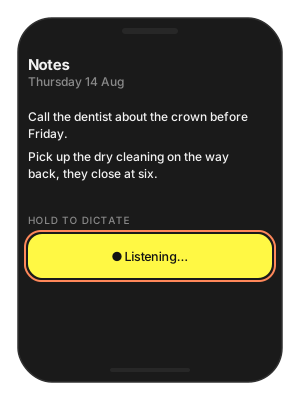
Press-and-hold dictation
Problem
Building — a notes app with a microphone button under the text.
Users want — hold the button, say a sentence, let go, and see the words appear at once. No live captions, no waiting spinner.
Hard part — audio must reach the model at exactly 16 kHz mono, each press must produce one accurate transcript, and the model must not be reloaded between presses.
Solution — what to use
MicAudioSource— the SDK’s microphone capture; delivers 16 kHz mono[Float]frames while the button is held.WhisperPipeline— loaded once for the screen’s lifetime.infer(audio:config:)— once, on release, withtimestamps: .NONE(the fastest decode when you only need text).Flutter:
TSASREngine—starton press,stopon release; the transcript arrives ontranscripts.
final class Dictation {
    private let stt: WhisperPipeline
    // SDK microphone: 16 kHz mono frames
    private let mic = MicAudioSource(sample_rate: 16_000)
    private var buffer: [Float] = []
    private var pump: Task<Void, Never>?

    init(stt: WhisperPipeline) { self.stt = stt }

    // Button pressed
    func begin() throws {
        buffer.removeAll(keepingCapacity: true)
        try mic.start()
        pump = Task {
            for await frame in mic.stream { buffer.append(contentsOf: frame) }
        }
    }

    // Button released
    func end() async throws -> String {
        mic.stop()
        await pump?.value
        let result = try stt.infer(
            audio: buffer,
            config: ASRGenerationConfig(language: "en", timestamps: .NONE)
        )
        return result.text
    }
}

// Once per screen
let stt = try await WhisperPipeline(
    engines_path: "TheStageAI/thewhisper-large-v3-turbo"
)
let dictation = Dictation(stt: stt)
// The SDK owns capture on Flutter: start on press, stop on release.
final asr = TSASREngine();
final sub = asr.transcripts.listen((text) => note.value += '$text ');

Future<void> onPressStart() => asr.start(config: {
      'vad': 'TheStageAI/silero-vad',
      'stt': 'TheStageAI/thewhisper-large-v3-turbo',
      'language': 'en',
    });
Future<void> onPressEnd() => asr.stop();
Attention
Keep the pipeline alive between presses. Loading is the slow part; a warm
inferon one sentence is well under a second.timestamps: .NONE— you do not need word timings here, and it is the fastest mode.Ignore releases under ~300 ms; they are taps, not sentences, and the model will invent a word for them.
Transcribe a recording the user already has
Problem
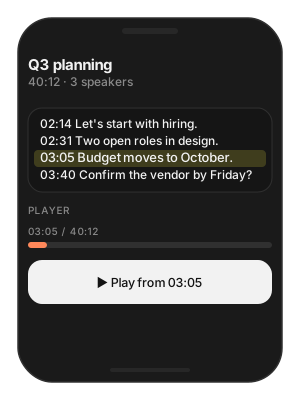
Building — a meeting recorder. Recordings are 30–60 minutes.
Users want — a transcript after the meeting, and to tap any sentence to jump the player to that moment.
Hard part — a 40-minute file must go in as one call without losing words at window boundaries, and every word needs a time.
Solution — what to use
AudioIO.load_wav(path:target_sample_rate:)— reads the file (anythingAVAudioFilereads: WAV, M4A, CAF) and resamples to 16 kHz.infer(audio:config:)with the whole file — windowing and stitching are automatic.overlap: 0.2— reuses 20 % of each window so a word on a cut is not lost.timestamps: .WORD—t0/t1per word, which is your seek position.
let stt = try await WhisperPipeline(
    engines_path: "TheStageAI/thewhisper-large-v3-turbo"
)

// any file AVAudioFile reads, resampled to 16 kHz
let samples = try AudioIO.load_wav(
    path: recordingURL.path,
    target_sample_rate: 16_000
)
let result = try stt.infer(
    audio: samples,
    config: ASRGenerationConfig(
        language: "en", timestamps: .WORD, overlap: 0.2
    )
)

// Group words into rows for the list; tap → seek
let words = result.words ?? []
func seek(to word: ASRWord) {
    player.seek(to: CMTime(seconds: word.t0, preferredTimescale: 1_000))
}
await TheStageFlutterSDK.start_model(
  model_name: 'stt',
  engines_path: 'TheStageAI/thewhisper-large-v3-turbo',
);

// 16 kHz mono float samples of the recording
final bytes = await File('/path/to/recording_16k.pcm').readAsBytes();
final pcm16k = Float32List.view(bytes.buffer);

final result = await ASREngine(stt: 'stt').infer(
  pcm16k,
  config: const ASRGenerationConfig(
    language: 'en',
    timestamps: ASRTimestampMode.WORD,
    overlap: 0.2,
  ),
);

// tap → seek
void seek(ASRWord word) =>
    player.seek(Duration(milliseconds: (word.t0 * 1000).round()));
Attention
Windows decode one after another: expect about
duration / rtfof wall time. On an M-series Mac a 40-minute file takes about two minutes — run it off the main thread and show progress.overlap: 0(the default) will lose words that straddle a 10-second cut.0.2is the right starting point.Build rows from
result.words(each hast0/t1), not by splittingresult.text— the text has no times.
Audio arrives from somewhere else
Problem
Building — a call-centre app that receives 8 kHz Int16 audio over the network, and a video app whose camera session runs at 48 kHz stereo.
Users want — transcripts, same as from the microphone.
Hard part — neither format is what infer accepts, and
feeding them directly does not fail: it returns nonsense.
Solution — what to use
Convert before the call: Int16 → Float with
/ 32768; any rate or channel count → 16 kHz mono withAVAudioConverter.infernever converts for you — by design, so a wrong rate is caught at your code, not inside the model.Flutter: the plugin passes samples through unchanged; resample in your audio layer and send
Float32List.
import AVFoundation

// Int16 → Float
// what your network / call SDK hands you
let int16Samples: [Int16] = incomingFrame.samples
let floats = int16Samples.map { Float($0) / 32_768 }

// 48 kHz stereo → 16 kHz mono, once per buffer
let src = AVAudioFormat(commonFormat: .pcmFormatFloat32,
                        sampleRate: 48_000, channels: 2, interleaved: false)!
let dst = AVAudioFormat(commonFormat: .pcmFormatFloat32,
                        sampleRate: 16_000, channels: 1, interleaved: false)!
let converter = AVAudioConverter(from: src, to: dst)!
// run converter.convert(to:error:withInputFrom:) over your buffers,
// then hand the mono 16 kHz floats to infer / stream.send
// Int16 → Float32List
// what your network / call SDK hands you
final Int16List int16Samples = incomingFrame.samples;
final floats = Float32List.fromList(
  [for (final s in int16Samples) s / 32768.0],
);
// Resample to 16 kHz in your audio layer before calling infer —
// the plugin passes samples through unchanged.
Attention
The symptom of a wrong rate is not an error, it is a wrong transcript: empty, or a few unrelated words. Check the rate first.
Downmix stereo by averaging the channels; do not just take the left one if the speaker may be panned.
Float64Listdoes not round-trip the Flutter platform channel. AlwaysFloat32List.
Live subtitles in a call or video UI
Problem
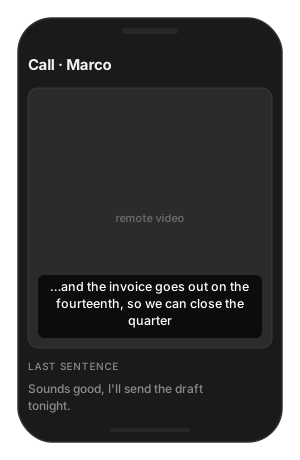
Building — an accessibility feature for a video-call app: subtitles of what the remote party is saying.
Users want — text that appears as the person speaks, does not jump around, and stays put once a sentence is finished.
Hard part — the audio is the remote party’s, not the microphone’s, and the SDK’s own mic would hear the wrong person.
Solution — what to use
ASREngine(pipeline:vad:)+open_stream— the push path, fed with the call SDK’s remote PCM.ASRTurn.committed/hypothesis— render the two differently: solid for committed, lighter for the guess.end_of_turn— move the finished sentence into the history and clear the live line.Flutter:
ASRStream.openwith the same events.
let stt = try await WhisperPipeline(
    engines_path: "TheStageAI/thewhisper-large-v3-turbo"
)
let silero = try SileroVAD(engines_path: "TheStageAI/silero-vad")
let engine = ASREngine(pipeline: stt, vad: silero)
let stream = try await engine.open_stream(
    ASRGenerationConfig(language: "en", timestamps: .WORD)
)

let render = Task {
    for await turn in stream.turns {
        if turn.end_of_turn {
            subtitles.commit(turn.committed)        // sentence is done
        } else {
            subtitles.live(committed: turn.committed,
                           guess: turn.hypothesis)
        }
    }
}

// The remote party's audio from your call SDK, 16 kHz mono frames
let remoteAudio16k: AsyncStream<[Float]> = callSDK.remotePCM16k
for await frame in remoteAudio16k { stream.send(frame) }
_ = await stream.close()
await render.value
await TheStageFlutterSDK.start_model(
  model_name: 'vad', engines_path: 'TheStageAI/silero-vad');
await TheStageFlutterSDK.start_model(
  model_name: 'stt', engines_path: 'TheStageAI/thewhisper-large-v3-turbo');

final stream = await ASRStream.open(
  model_name: 'stt',
  vad_model_name: 'vad',
  generation: const ASRGenerationConfig(language: 'en'),
);
final render = stream.events.listen((e) {
  if (!e.is_turn) return;
  final committed  = e.payload['committed'] as String;
  final hypothesis = e.payload['hypothesis'] as String;
  if (e.payload['end_of_turn'] == true) {
    subtitles.commit(committed);
  } else {
    subtitles.live(committed: committed, guess: hypothesis);
  }
});

// The remote party's audio from your call SDK, 16 kHz mono frames
final Stream<Float32List> remoteAudio16k = callSdk.remotePcm16k;
await for (final Float32List frame in remoteAudio16k) {
  await stream.send(frame);
}
await stream.close();
await render.cancel();
Attention
Subscribe to
turns/eventsbefore the firstsend.Style the guess visibly lighter. Users forgive a guess that looks like a guess; they do not forgive solid text that changes.
Leave
ASRStreamingConfigempty: TheWhisper’s default commits whole sentences, which is what subtitles want.
Users who speak several languages
Problem
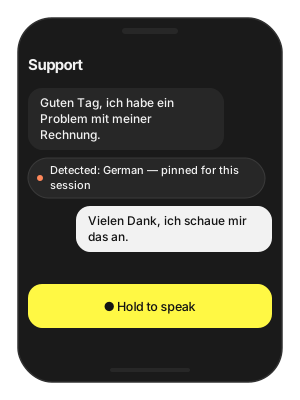
Building — a support app shipped across Europe.
Users want — to just talk, in German or French or Italian, without picking a language first.
Hard part — a wrong language hint is worse than none: TheWhisper
told "en" will transcribe German speech as English-sounding
nonsense rather than fail.
Solution — what to use
language: "auto"on the first utterance; readresult.languageto learn what was spoken.Pin that code for the rest of the session — a correct hint is faster and more accurate than detection.
Show the detected language so the user can correct it.
let stt = try await WhisperPipeline(
    engines_path: "TheStageAI/thewhisper-large-v3-turbo"
)

// First utterance: detect
var result = try stt.infer(
    audio: firstUtterance,
    config: ASRGenerationConfig(language: "auto")
)
// e.g. "de"
let detected = result.language ?? "en"
languageChip.text = "Detected: \(Locale.current.localizedString(forLanguageCode: detected) ?? detected)"

// Later utterances: pin it
result = try stt.infer(
    audio: nextUtterance,
    config: ASRGenerationConfig(language: detected)
)
await TheStageFlutterSDK.start_model(
  model_name: 'stt',
  engines_path: 'TheStageAI/thewhisper-large-v3-turbo',
);
final stt = ASREngine(stt: 'stt');

// First utterance: detect
var result = await stt.infer(
  firstUtterance, config: const ASRGenerationConfig(language: 'auto'));
// e.g. 'de'
final detected = result.language ?? 'en';

// Later utterances: pin it
result = await stt.infer(
  nextUtterance, config: ASRGenerationConfig(language: detected));
Attention
If transcripts look like word salad, check the hint before anything else.
Qwen3-ASR also accepts English names —
"Japanese"— handy when the value comes from a settings screen.Codes are ISO 639-1 (
en fr de es pt ru ja ko zh ar hi it…).
The engine ends turns too early — or too late
Problem
Building — a voice form: the user dictates an address field by field.
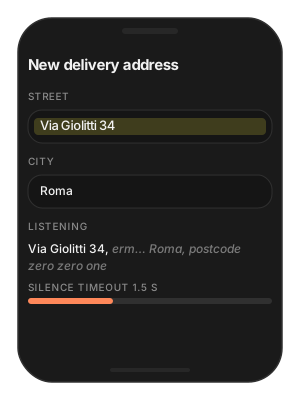
Users want — to pause and think mid-address without the field being submitted half-finished; other users want a snappy “done” the moment they stop.
Hard part — “the user has finished” is a policy, not a fact, and the right value differs between dictation and quick commands.
Solution — what to use
ASREngine(config:)— the SDK owns the mic and the turn policy.TurnConfig.silence_timeout_ms— how long a pause means “done”: ~600 ms for commands, 1 000–1 500 ms for dictation.asr_silence_hangover_ms— trailing audio still sent to the decoder so the last word is not clipped; leave the default.Flutter:
turn_silence_timeout_msonTSASREngine.start.
var config = TSAgentConfig(
    vad: "TheStageAI/silero-vad",
    stt: "TheStageAI/thewhisper-large-v3-turbo"
)
var turn = TurnConfig()
// default 608: wait longer for thinkers
turn.silence_timeout_ms = 1_500
turn.asr_silence_hangover_ms = 300
config.turn_config = turn

let engine = ASREngine(config: config)
Task { for await text in engine.transcripts.recv() { field.text = text } }
try await engine.start()
// stop() then start() after changing turn_config
final asr = TSASREngine();
asr.transcripts.listen((text) => field.value = text);
await asr.start(config: {
  'vad': 'TheStageAI/silero-vad',
  'stt': 'TheStageAI/thewhisper-large-v3-turbo',
  'language': 'en',
  // default 608
  'turn_silence_timeout_ms': 1500,
  'turn_asr_silence_hangover_ms': 300,
});
// stop() then start() to change it
Attention
silence_timeout_msis a product decision; there is no single right value. Dictation and commands want different screens.The hangover is not the timeout. Leave it unless final words are being cut.
If the engine starts turns on background noise, that is
vad_config.threshold(Swift), not the turn policy.
Troubleshooting
Symptom |
Cause |
Fix |
|---|---|---|
Empty or nonsense transcript |
Audio is not 16 kHz mono float. |
Check the rate first. Convert Int16 with |
Words drop mid-file |
|
|
Foreign speech comes out as English |
Wrong |
|
“Thank you.” on silence |
Decoder ran on hush without VAD. |
Use |
Captions are empty |
Subscribed after |
Subscribe first. |
Text jumps around |
Rendering |
Two labels: |
Slow on long recordings |
Windows decode sequentially. |
Expected; show progress. Skip silence by streaming turns instead of one giant buffer. |
|
|
Leave |
Model load fails |
|
|
Flutter type error on |
|
|
Load Progress / Prefetch / Cleanup
First run downloads and prepares the pack; later runs hit the cache. Show progress the first time, warm the cache on a splash screen, and release models you are done with.
let ai = TheStageAI.shared

// Progress
let stt = try await WhisperPipeline(
    engines_path: "TheStageAI/thewhisper-large-v3-turbo",
    on_load_progress: { p in
        print("[\(p.model)] \(p.phase) \(Int(p.fraction * 100))%")
    }
)

// Prefetch on a splash screen, construct later
let engines_dir = try await ai.prefetch_engines(
    repo_id: "TheStageAI/thewhisper-large-v3-turbo"
)
let stt = try await WhisperPipeline(engines_path: engines_dir)

// Cleanup: drop the reference, or
_ = try ai.stop_model(model_name: "stt")
// Progress
TheStageFlutterSDK.on_progress.listen((event) {
  if (event['model_name'] != 'stt') return;
  print('[stt] ${event['phase']} ${((event['progress'] ?? 0) * 100).round()}%');
});

await TheStageFlutterSDK.start_model(
  model_name: 'stt',
  engines_path: 'TheStageAI/thewhisper-large-v3-turbo',
);

// Cleanup
await TheStageFlutterSDK.stop_model(model_name: 'stt');
Phases: downloading → extracting → loading → ready. Cache
hits skip the first two. Full contract: TheStage Apple SDK
(Load Progress).