VLM (Vision-Language Model)
On-device vision. Give the model a photo and a question, and it answers in text — a caption, an OCR transcription, a comparison of two frames, or fields extracted as JSON. The image never leaves the device.
Use it like the LLM: one call, one answer, or a streamed reply. The only new input is the image.
Main features
One pack, four jobs: captions, visual Q&A, OCR / document text, and structured field extraction from a single
TSVLM.Several images at once: compare, spot the difference, or add up receipts across frames.
Streaming replies: the same token deltas as the LLM page, so a caption fills in as it is written.
Deterministic OCR:
temperature = 0gives repeatable text.Same knobs as LLM:
LLMGenerationConfigcarries over; nothing new to learn.Nothing to preprocess: pass a
CGImageor a file path. No resizing, no normalisation.
In this page
Here we will cover the following topics:
Supported models: LFM2.5-VL-450M and what it does well.
Quick start: caption a photo — Swift and Flutter side by side.
Ask about an image: the call, how to pass images, and the generation knobs.
Result object:
LLMResultand the latency breakdown.Usage Guides: receipts to JSON, accessibility captions, before/after comparison, a slow first token, VLM inside a voice app.
Troubleshooting: symptom → cause → fix.
Load Progress / Prefetch / Cleanup: first-run download, warming the cache, releasing models.
Supported models
Model |
HF repo |
Size |
Device |
Fleet pin |
|---|---|---|---|---|
LFM2.5-VL-450M |
|
450M |
NPU |
v1.2 |
Feature |
LFM2.5-VL-450M |
|---|---|
Captions / visual Q&A |
yes |
OCR / document text |
yes |
Structured field extraction |
yes |
Multiple images per call |
yes, 2–4 recommended |
Streaming |
yes, Swift and Flutter |
Image tokens and text share one context window. Dense pages and long prompts compete for it — crop to the region you care about.
Quick start
import TheStageSDK

try await TheStageAI.shared.initialize(api_token: "your-api-token")

let vlm = try await TSVLM(
    engines_path: "TheStageAI/LFM2.5-VL-450M"
)

let image = try ImageIOHelpers.load_cgimage(path: "/path/to/photo.jpg")

var config = vlm.generation_defaults
config.max_new_tokens = 96
// repeatable captions
config.temperature = 0

let result = try vlm.infer(
    images: [image],
    prompt: "Describe this image in one sentence.",
    config: config
)
print(result.text)
import 'package:thestage_apple_sdk/thestage_apple_sdk.dart';

await TheStageFlutterSDK.initialize(api_token: 'your-api-token');
await TheStageFlutterSDK.start_model(
  model_name: 'vlm',
  engines_path: 'TheStageAI/LFM2.5-VL-450M',
);

final rows = await TheStageFlutterSDK.infer(
  model_name: 'vlm',
  input_json: {
    // or 'image_base64'
    'image': '/absolute/path/to/photo.jpg',
    'prompt': 'Describe this image in one sentence.',
    'max_new_tokens': 96,
    // repeatable captions
    'temperature': 0,
  },
);
print(rows[0]['text']);
Important API
Purpose |
Swift |
Flutter |
|---|---|---|
Load a model |
|
|
Load an image |
|
|
One answer |
|
|
Streamed answer |
|
|
Release |
drop the object |
|
Ask about an image
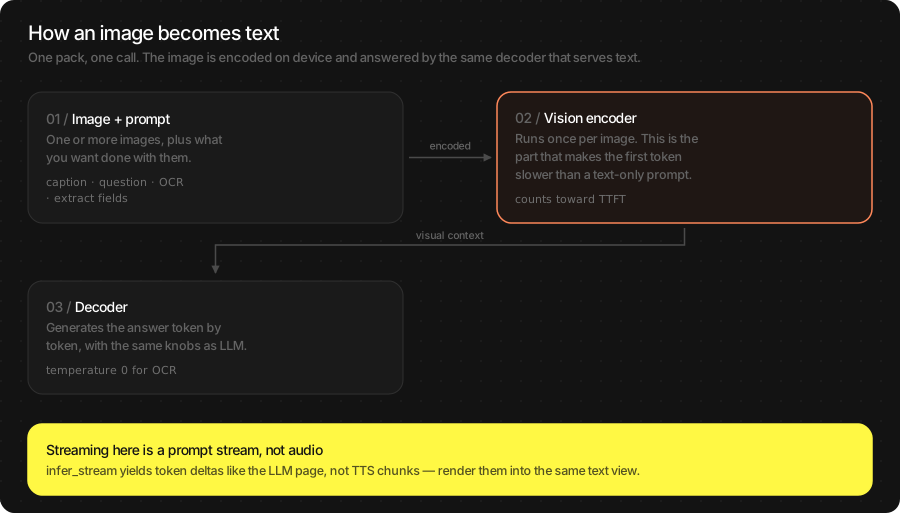
One or more images plus a prompt. The prompt decides the job: “describe” gives a caption, “how many” gives an answer, “transcribe exactly” gives OCR, “extract as JSON” gives fields. Streaming works the same as the LLM — the first token just arrives after the image is encoded.
let vlm = try await TSVLM(engines_path: "TheStageAI/LFM2.5-VL-450M")

// From disk, from bytes, or straight from the camera
let a = try ImageIOHelpers.load_cgimage(path: "/tmp/before.jpg")
// Data from a download
let b = try ImageIOHelpers.load_cgimage(data: jpegData)
// UIImage from the camera
let c: CGImage = capturedImage.cgImage!

var config = vlm.generation_defaults
config.max_new_tokens = 192
config.temperature = 0

// Batch, two images
let result = try vlm.infer(
    images: [a, b],
    prompt: "The first image is BEFORE, the second is AFTER. List the differences.",
    config: config
)

// Streaming, one image
for await chunk in try vlm.infer_stream(
    images: [c], prompt: "Describe this photo.", config: config
) {
    if !chunk.is_final { caption.text += chunk.text }
}
await TheStageFlutterSDK.start_model(
  model_name: 'vlm',
  engines_path: 'TheStageAI/LFM2.5-VL-450M',
);

// Batch, two images: numbered keys, contiguous from 0
final rows = await TheStageFlutterSDK.infer(
  model_name: 'vlm',
  input_json: {
    'image_0': '/tmp/before.jpg',
    // or 'image_base64_1'
    'image_1': '/tmp/after.jpg',
    'prompt': 'The first image is BEFORE, the second is AFTER. List the differences.',
    'max_new_tokens': 192,
    'temperature': 0,
  },
);

// Streaming, one image
await for (final chunk in TheStageFlutterSDK.infer_stream(
  model_name: 'vlm',
  input_json: {
    'image_base64': base64Encode(await File('/path/to/photo.jpg').readAsBytes()),
    'prompt': 'Describe this photo.',
  },
)) {
  if (chunk['is_final'] == true) break;
  caption.value += chunk['delta'] as String? ?? '';
}
Passing images
Field |
Where |
Accepts |
|---|---|---|
|
Swift |
|
|
Flutter |
Absolute file path (JPEG, PNG, BMP). |
|
Flutter |
Base64-encoded image bytes, when you have no file. |
|
both |
Required. |
|
both |
Optional. |
Formats: anything ImageIO decodes — JPEG, PNG, HEIC. Do not resize or normalise; the encoder does that. Do rotate EXIF-sideways camera frames upright first.
Generation options — the LLM’s LLMGenerationConfig, with the
defaults that matter here:
Field |
Default |
Change it when |
|---|---|---|
|
pack |
``0`` for OCR and extraction — same image, same text every time. Leave the pack default for captions if you want variety. |
|
pack |
Dense OCR or long JSON stops early ( |
|
none |
Fix the output format once (“Reply with JSON only”) instead of repeating it in every prompt. |
Result object
The same LLMResult as the LLM page, plus a vision-encode timing.
The first token waits for the encoder, so a spinner through
encode_seconds is honest UI.
let vlm = try await TSVLM(engines_path: "TheStageAI/LFM2.5-VL-450M")
var config = vlm.generation_defaults
config.temperature = 0

let result = try vlm.infer(images: [image], prompt: prompt, config: config)
// caption / answer / OCR text
result.text
// "eos" or "max_new_tokens"
result.stop_reason
// vision encoder — most of the first-token wait
result.encode_seconds
result.tokens_per_second
final r = rows[0];
r['text'];
r['stop_reason'];
r['encode_seconds'];
r['tokens_per_second'];
Field |
Meaning |
|---|---|
|
The answer. |
|
|
|
Vision encoder time. Paid once per image, before the first token. |
|
Decoder phases. |
|
Speed and wall time. |
Usage Guides
Each guide is one production question: what you are building, what to use, the code, and what not to forget.
Turn a photographed receipt into fields
Problem
Building — an expense app: the user photographs a receipt.
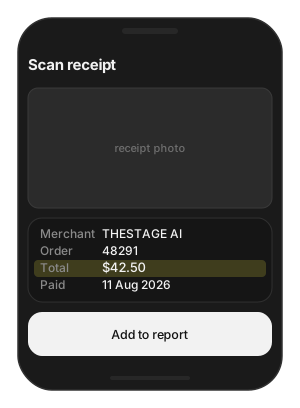
Users want — merchant, total and date filled in from the photo — on the phone, because receipts are private.
Hard part — the answer must be JSON every time, from a photo taken at an angle under bad light, and the vision encoder is the slow part.
Solution — what to use
TSVLM— loaded once per screen.vlm.infer(images:prompt:system_prompt:config:)— the system prompt asks for JSON only and names the fields.ImageIOHelpers.load_cgimage(path:)— crop to the receipt first.temperature = 0— same photo, same answer; failures are reproducible.Flutter:
'image'path key, parserows[0]['text'].
let vlm = try await TSVLM(engines_path: "TheStageAI/LFM2.5-VL-450M")

var config = vlm.generation_defaults
config.max_new_tokens = 256
config.temperature = 0

// the photo the user just took (URL from your camera / picker)
let receiptURL: URL = picker.selectedFileURL

let result = try vlm.infer(
    images: [try ImageIOHelpers.load_cgimage(path: receiptURL.path)],
    prompt: "Extract the fields.",
    system_prompt: #"Reply with JSON only, no markdown: "#
        + #"{"merchant":string,"order_id":string,"total":string,"paid_date":string}"#,
    config: config
)
let fields = try JSONDecoder(
    ).decode(Receipt.self,
    from: Data(result.text.utf8)
)
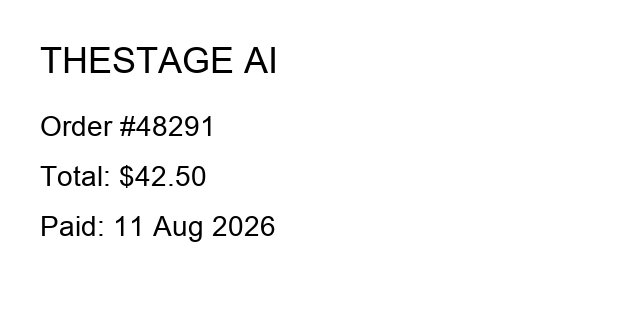
// {"merchant":"THESTAGE AI","order_id":"48291","total":"$42.50","paid_date":"11 Aug 2026"}
await TheStageFlutterSDK.start_model(
  model_name: 'vlm',
  engines_path: 'TheStageAI/LFM2.5-VL-450M',
);

final rows = await TheStageFlutterSDK.infer(
  model_name: 'vlm',
  input_json: {
    'image': '/absolute/path/to/receipt.jpg',
    'prompt': 'Extract the fields.',
    'system_prompt':
      'Reply with JSON only, no markdown: '
      '{"merchant":string,"order_id":string,"total":string,"paid_date":string}',
    'max_new_tokens': 256,
    'temperature': 0,
  },
);
final fields = jsonDecode(rows[0]['text'] as String);
Attention
Crop to the receipt before sending. Table edges and background eat image tokens and lower accuracy.
If the model wraps JSON in code fences, strip them before decoding and tighten the system prompt.
Keep
temperature = 0; a retry at 0 returns the same text, so failures are reproducible and debuggable.Measured on an M-series Mac for the sample above: encode 0.34 s, prefill 0.06 s, decode 0.16 s.
Describe photos for accessibility
Problem
Building — a social app that posts photos.
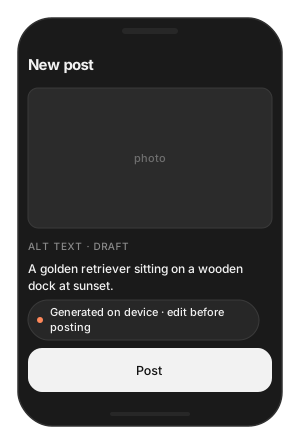
Users want — alt text for every photo, ready before they hit Post, in one sentence a screen reader can speak.
Hard part — generation must finish while the user is still on the screen, must stay short, and must be editable — it is a draft, not a fact.
Solution — what to use
vlm.infer_stream(images:prompt:config:)— the field fills in as words arrive.Prompt: “one plain sentence”;
max_new_tokens = 48— otherwise the model narrates.Show the result in an editable field.
Flutter:
'image_base64'when the bytes are already in memory.
let vlm = try await TSVLM(engines_path: "TheStageAI/LFM2.5-VL-450M")

var config = vlm.generation_defaults
config.max_new_tokens = 48

// the photo the user attached to the post
let photoURL: URL = picker.selectedFileURL

altText.text = ""
for await chunk in try vlm.infer_stream(
    images: [try ImageIOHelpers.load_cgimage(path: photoURL.path)],
    prompt: "Describe this image in one plain sentence for a screen reader.",
    config: config
) {
    if !chunk.is_final { altText.text += chunk.text }
}
await TheStageFlutterSDK.start_model(
  model_name: 'vlm',
  engines_path: 'TheStageAI/LFM2.5-VL-450M',
);

// the photo the user attached to the post
final photoPath = picked.path;

altText.value = '';
await for (final chunk in TheStageFlutterSDK.infer_stream(
  model_name: 'vlm',
  input_json: {
    'image_base64': base64Encode(await File(photoPath).readAsBytes()),
    'prompt': 'Describe this image in one plain sentence for a screen reader.',
    'max_new_tokens': 48,
  },
)) {
  if (chunk['is_final'] == true) break;
  altText.value += chunk['delta'] as String? ?? '';
}
Attention
Say “one sentence” and cap
max_new_tokenslow; the model will otherwise narrate.Let the user edit the result. Ship it as a draft, not a fact.
Compare two frames
Problem
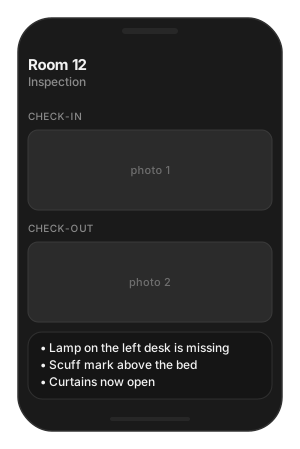
Building — a property-inspection app that photographs a room at check-in and check-out.
Users want — a short list of what changed, with “none” when nothing did.
Hard part — the model must know which image is which, and too many images starve the reply of context.
Solution — what to use
vlm.infer(images: [checkIn, checkOut], …)— both images in one call, in the order you name them in the prompt.Prompt: “The first image is CHECK-IN, the second is CHECK-OUT …”.
Two to four images per call.
Flutter: numbered keys
image_0,image_1— contiguous, from zero.
let vlm = try await TSVLM(engines_path: "TheStageAI/LFM2.5-VL-450M")
var config = vlm.generation_defaults
config.temperature = 0

// the two photos from the inspection record
let checkInURL: URL = inspection.checkInPhoto
let checkOutURL: URL = inspection.checkOutPhoto

let result = try vlm.infer(
    images: [try ImageIOHelpers.load_cgimage(path: checkInURL.path),
             try ImageIOHelpers.load_cgimage(path: checkOutURL.path)],
    prompt: "The first image is CHECK-IN, the second is CHECK-OUT. "
          + "List visible differences as short bullets. Say 'none' if identical.",
    config: config
)
await TheStageFlutterSDK.start_model(
  model_name: 'vlm',
  engines_path: 'TheStageAI/LFM2.5-VL-450M',
);

final rows = await TheStageFlutterSDK.infer(
  model_name: 'vlm',
  input_json: {
    'image_0': '/absolute/path/to/check_in.jpg',
    'image_1': '/absolute/path/to/check_out.jpg',
    'prompt': 'The first image is CHECK-IN, the second is CHECK-OUT. '
              'List visible differences as short bullets. Say "none" if identical.',
    'max_new_tokens': 192,
    'temperature': 0,
  },
);
Attention
Name the images in the prompt. “First” and “second” follow the order you pass.
Two to four images per call; more than that starves the reply of context and the answer truncates.
Numbered Flutter keys must start at
image_0and be contiguous.
The first token is slow
Problem
Building — any screen that attaches a photo to a prompt.
Users want — the same snappy reply they get from text-only prompts.
Hard part — the vision encoder is paid once per image before any text, and it is slowest the very first time after load.
Solution — what to use
Warm once at launch: one
inferon a tiny bundled image, detached.infer_streamand a spinner until the first delta — the encode time becomes visible progress.result.encode_seconds— see exactly what you pay.Load the VLM for the task and release it; do not keep it resident next to ASR + LLM + TTS on a phone.
let vlm = try await TSVLM(engines_path: "TheStageAI/LFM2.5-VL-450M")
var config = vlm.generation_defaults
config.temperature = 0

// Warm once at launch, off the main path
Task.detached {
    let warmPath = Bundle.main.path(forResource: "warmup", ofType: "png")!
    let warm = try ImageIOHelpers.load_cgimage(path: warmPath)
    _ = try? vlm.infer(images: [warm], prompt: "hi", config: config)
}

// Show progress through encode; the first delta ends it
spinner.start()
// the photo the user picked, and their question
let photoURL: URL = picker.selectedFileURL
let prompt = "What is in this photo?"
let photo = try ImageIOHelpers.load_cgimage(path: photoURL.path)
for await chunk in try vlm.infer_stream(
    images: [photo], prompt: prompt, config: config
) {
    spinner.stop()
    if !chunk.is_final { caption.text += chunk.text }
}
await TheStageFlutterSDK.start_model(
  model_name: 'vlm',
  engines_path: 'TheStageAI/LFM2.5-VL-450M',
);

// Warm once at launch
unawaited(TheStageFlutterSDK.infer(
  model_name: 'vlm',
  // any small bundled image
  input_json: {'image': warmupPngPath, 'prompt': 'hi'},
  ));

// the photo the user picked, and their question
final photoPath = picked.path;
const prompt = 'What is in this photo?';

// Spinner until the first delta
spinner.value = true;
await for (final chunk in TheStageFlutterSDK.infer_stream(
  model_name: 'vlm', input_json: {'image': photoPath, 'prompt': prompt})) {
  spinner.value = false;
  if (chunk['is_final'] == true) break;
  caption.value += chunk['delta'] as String? ?? '';
}
Attention
Read
encode_secondson the result to see exactly what you are paying.Do not keep VLM resident next to ASR + LLM + TTS on a phone; load it for the task and release it — see the next guide.
Add vision to a voice assistant
Problem
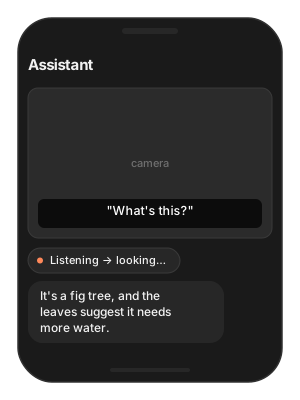
Building — a voice assistant with a camera button.
Users want — point the camera, ask “what’s this?”, hear the answer — while the assistant keeps talking normally.
Hard part — a 450M vision model loading while TTS streams causes audible stutter, and a phone cannot hold four models resident.
Solution — what to use
agent.state— only run vision in.listening/.idle.TSVLMcreated for the question,vlm.infer(images: [frame], prompt:), then dropped — the pack is released.agent.say(answer)— the reply goes through the agent’s speaker.Camera frame as
CGImagefrom yourAVCaptureSession.Flutter:
start_model→infer→stop_modelaround the question.
var config = vlm.generation_defaults
config.temperature = 0

// your running agent — see the Voice Agent page
let agent: TSVoiceAgent = assistant.agent

// Only while the agent is not mid-reply
guard agent.state == .listening || agent.state == .idle else { return }

let vlm = try await TSVLM(engines_path: "TheStageAI/LFM2.5-VL-450M")
// from your AVCaptureSession
let frame: CGImage = camera.latestFrame
// the user's transcribed request, from agent.transcripts
let question = "What's this?"
let answer = try vlm.infer(images: [frame], prompt: question, config: config).text
agent.say(answer)
// drop `vlm` here — it releases the pack
// agent as in Quick start; agentConfig is its model map
final agent = TSVoiceAgent();

// The custom-node pattern (VLMCaptionNode + ModelRoster) is in
// examples/voice_agent_custom_nodes in the AppleSDK repo.
// your running agent — see the Voice Agent page
final TSVoiceAgent agent = assistant.agent;
if (agent.state == TSAgentState.listening) {
  await TheStageFlutterSDK.start_model(
    model_name: 'vlm', engines_path: 'TheStageAI/LFM2.5-VL-450M');
  final rows = await TheStageFlutterSDK.infer(
    model_name: 'vlm',
    input_json: {
      // JPEG you saved from the camera
      'image': cameraFramePath,
      'prompt': question,
    });
  await agent.say(rows[0]['text'] as String);
  await TheStageFlutterSDK.stop_model(model_name: 'vlm');
}
Attention
Gate on agent state. Loading a 450M model while TTS is streaming causes audible stutter.
Full wiring, including a node that receives camera frames: Voice Agent.
Troubleshooting
Symptom |
Cause |
Fix |
|---|---|---|
Empty caption |
No image reached the model — bad path, empty base64, nil
|
Log that the image loaded; on Flutter use an absolute container path or base64. |
OCR misses small text |
Whole page sent at once. |
Crop to the text region; keep |
Answer cut off |
|
Raise the cap, or crop / shorten the prompt — vision tokens share the window. |
Sideways or mirrored reading |
Camera frame not EXIF-upright. |
Rotate before encoding. |
Slow first token |
Vision encode, cold. |
Warm at launch; stream; show a spinner until the first delta. |
Flutter: |
Keys not contiguous from |
Number from 0. |
Out of memory next to the agent |
VLM resident with ASR + LLM + TTS. |
Load for the task, release after. |
Load Progress / Prefetch / Cleanup
First run downloads and prepares the pack; later runs hit the cache. Show progress the first time, warm the cache on a splash screen, and release models you are done with.
let ai = TheStageAI.shared

// Progress
let vlm = try await TSVLM(
    engines_path: "TheStageAI/LFM2.5-VL-450M",
    on_load_progress: { p in
        print("[\(p.model)] \(p.phase) \(Int(p.fraction * 100))%")
    }
)

// Prefetch on a splash screen, construct later
let engines_dir = try await ai.prefetch_engines(
    repo_id: "TheStageAI/LFM2.5-VL-450M"
)
let vlm = try await TSVLM(engines_path: engines_dir)

// Cleanup: drop the reference, or
_ = try ai.stop_model(model_name: "vlm")
// Progress
TheStageFlutterSDK.on_progress.listen((event) {
  if (event['model_name'] != 'vlm') return;
  print('[vlm] ${event['phase']} ${((event['progress'] ?? 0) * 100).round()}%');
});

await TheStageFlutterSDK.start_model(
  model_name: 'vlm',
  engines_path: 'TheStageAI/LFM2.5-VL-450M',
);

// Cleanup
await TheStageFlutterSDK.stop_model(model_name: 'vlm');
Phases: downloading → extracting → loading → ready. Cache
hits skip the first two. Full contract: TheStage Apple SDK
(Load Progress).